
An alert workflow people keep turned on sends fewer, clearer messages. It receives each alert, skips repeats of the same problem, rewrites the alert as a short summary, and posts one Slack card with buttons to claim or silence it. If your team mutes the channel within a month, the workflow was a demo, not a tool.
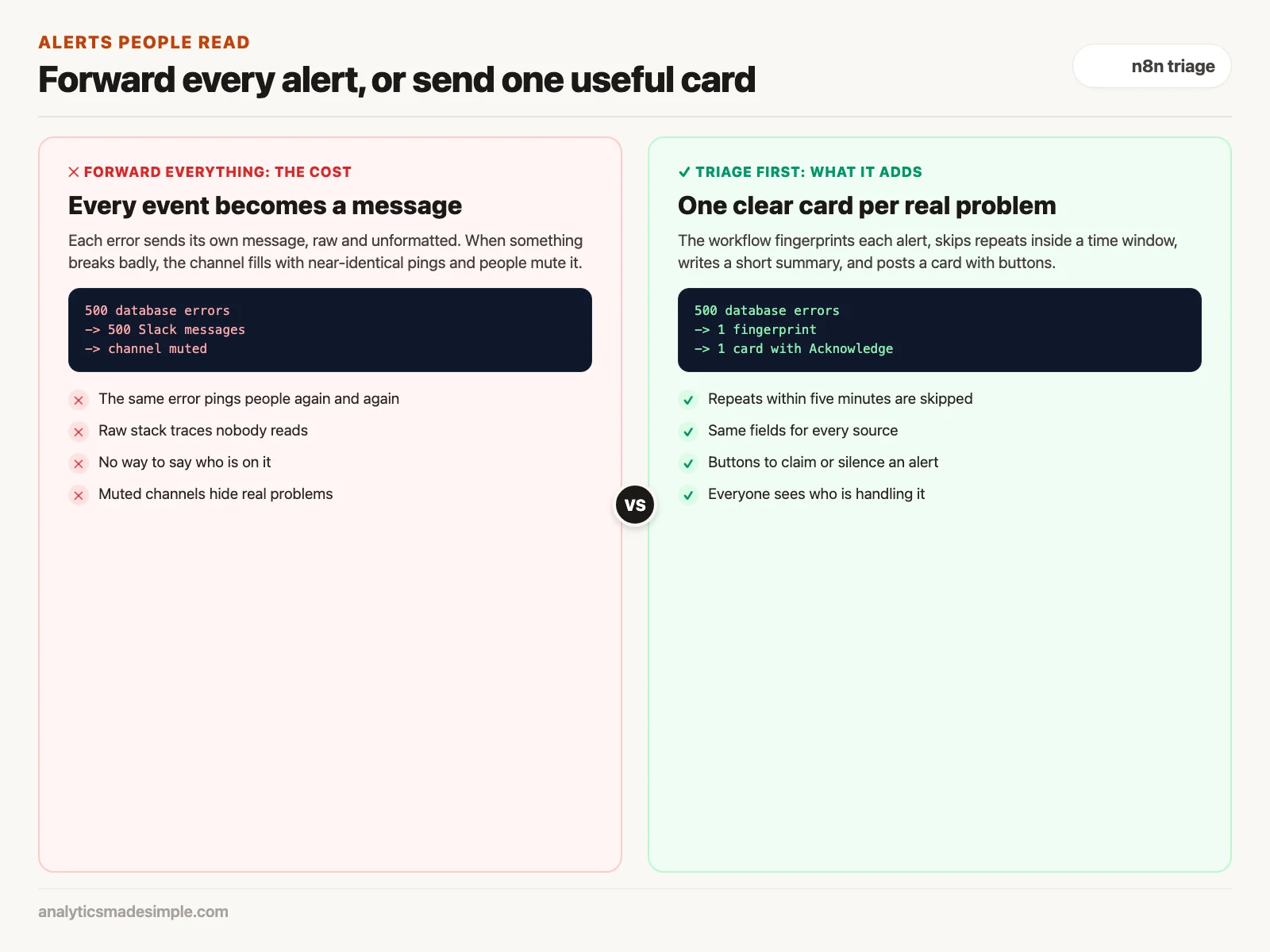
Say your database goes down at night and every failed request sends its own message to your team’s chat. By morning there are hundreds of near-identical pings, so you mute the channel, and the next real problem goes unseen. A triage workflow would have sent one card and counted the repeats.
This post builds that workflow in n8n, the open-source automation tool from the last post. It starts with a webhook, a message another app sends to n8n the moment something happens, and ends with a card in Slack, a team chat app.
What makes an alert workflow worth keeping
A good alert workflow filters noise instead of forwarding everything. It needs four things: skipping repeats of the same alert within a time window, a short summary instead of raw error text, a severity level, and buttons so people can act from the chat itself.
The four stages of the workflow
Piping alerts straight into Slack is not enough. The workflow needs to check and reshape each alert on the way through, in four stages.
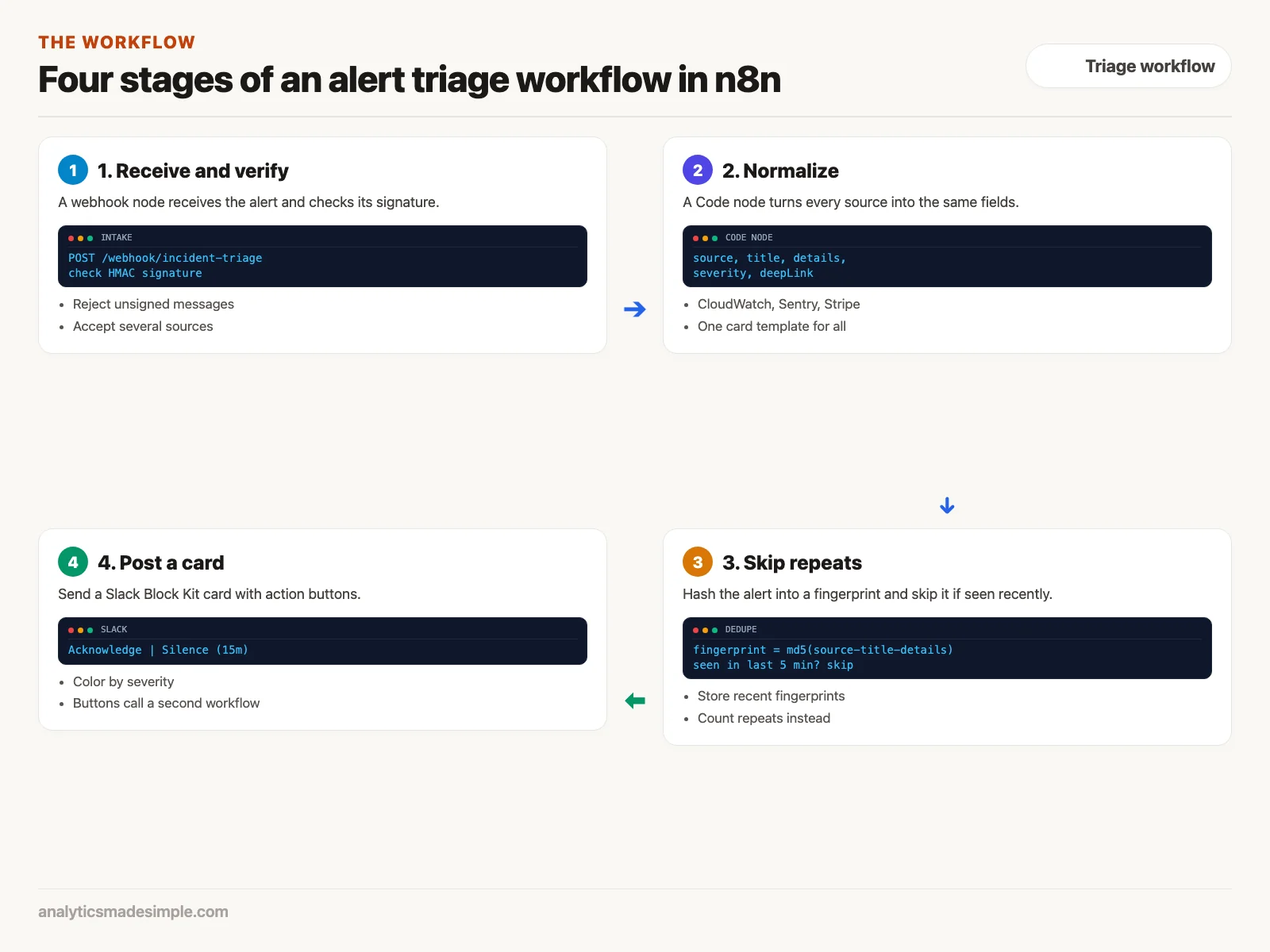
- Receive and verify: A webhook node listens at an address such as
/webhook/incident-triage. Alerts might come from Amazon CloudWatch, a monitoring service on Amazon Web Services, from Sentry, which reports app errors, or from Stripe, the payments service. The node checks each message’s signature, an HMAC (hash-based message authentication code, a stamp that proves who sent it), so outsiders cannot post fake alerts. - Normalize: A Code node turns every source into the same fields: source, title, details, severity, and a link. The code in the next section does this step for three sources.
- Skip repeats: The workflow combines each alert’s key details into a fingerprint, a short code that is identical for identical alerts. If the same fingerprint arrived in the last five minutes, it skips the message and counts the repeat instead. A burst of 500 identical errors becomes one card.
- Post a card: The workflow sends a Slack card colored by severity, with buttons such as “Acknowledge Incident.”
The Code node that normalizes alerts
n8n’s Code node runs JavaScript or Python inside your workflow. This JavaScript reads alerts from CloudWatch, Sentry, and Stripe and turns each into the same shape. In n8n, the code runs inside a function, so the return at the end hands the results to the next node.
// n8n Code Node (Run Once for All Items)
const items = $input.all();
const normalizedIncidents = [];

for (const item of items) {
    const raw = item.json;
    let source = "Unknown";
    let title = "System Warning";
    let details = "No extended details provided.";
    let severity = "P3";
    let deepLink = "https://internal.company.com/dashboard";

    // 1. Detect and normalize AWS CloudWatch Alarms
    if (raw.AlarmName) {
        source = "AWS CloudWatch";
        title = raw.AlarmName;
        details = raw.NewStateReason || "Threshold breached.";
        severity = raw.NewStateValue === "ALARM" ? "P1" : "P3";
        deepLink = `https://console.aws.amazon.com/cloudwatch/home#alarmsV2:alarm/${encodeURIComponent(raw.AlarmName)}`;
    }
    // 2. Detect and normalize Sentry Error Exceptions
    else if (raw.event && raw.project_name) {
        source = `Sentry (${raw.project_name})`;
        title = raw.event.title || "Unhandled Exception";
        details = (raw.event.message || raw.event.culprit || "Trace omitted").slice(0, 240);
        severity = raw.level === "fatal" ? "P1" : "P2";
        deepLink = raw.url || deepLink;
    }
    // 3. Detect and normalize Stripe Financial Disputes
    else if (raw.type && raw.type.startsWith("charge.dispute")) {
        source = "Stripe Billing";
        title = `Chargeback Filed: $${(raw.data.object.amount / 100).toFixed(2)}`;
        details = `Reason: ${raw.data.object.reason}. Evidence due by ${new Date(raw.data.object.evidence_details.due_by * 1000).toLocaleDateString()}`;
        severity = "P2";
        deepLink = `https://dashboard.stripe.com/disputes/${raw.data.object.id}`;
    }

    // Generate unique fingerprint for sliding-window deduplication
    const rawSignature = `${source}-${title}-${details.slice(0, 60)}`;
    const crypto = require("crypto");
    const fingerprint = crypto.createHash("md5").update(rawSignature).digest("hex");

    normalizedIncidents.push({
        json: {
            source,
            title,
            details,
            severity,
            deepLink,
            fingerprint,
            timestamp: new Date().toISOString(),
            isCritical: severity === "P1"
        }
    });
}

return normalizedIncidents;
In plain words: for each incoming alert, it checks which fields are present to tell the sources apart. A CloudWatch alarm has AlarmName, a Sentry error has event and project_name, and a Stripe dispute has a type starting with charge.dispute. It copies the useful parts into the shared fields and sets a severity, P1 being the most urgent. Then it builds the fingerprint with an MD5 hash of the source, title, and start of the details.
Run outside n8n with one sample alert from each source, it produced these three results. The CloudWatch alarm came out as severity P1, the Sentry error as P2, and the Stripe dispute as “Chargeback Filed: $49.99” at P2. Every later step reads the same fields, so one card template works for all three sources.
Buttons that let people act from Slack
A plain text alert is easy to scroll past. Slack’s Block Kit format lets you build a card with a header, sections, fields, and buttons. Each button has an action_id and a value, here the incident’s ID:
{
  "type": "actions",
  "block_id": "incident_actions_block",
  "elements": [
    {
      "type": "button",
      "text": {
        "type": "plain_text",
        "text": "Acknowledge Incident"
      },
      "style": "primary",
      "action_id": "ack_incident_button",
      "value": "incident_prod_db_timeout_20261220"
    },
    {
      "type": "button",
      "text": {
        "type": "plain_text",
        "text": "Silence Alert (15m)"
      },
      "style": "danger",
      "action_id": "silence_alert_button",
      "value": "incident_prod_db_timeout_20261220"
    }
  ]
}
When someone clicks a button, Slack sends the click, including who clicked, to an address you choose. A second n8n workflow receives it, and according to Slack’s documentation on handling interactions, your app must acknowledge the click within three seconds, so the workflow does three things in order.
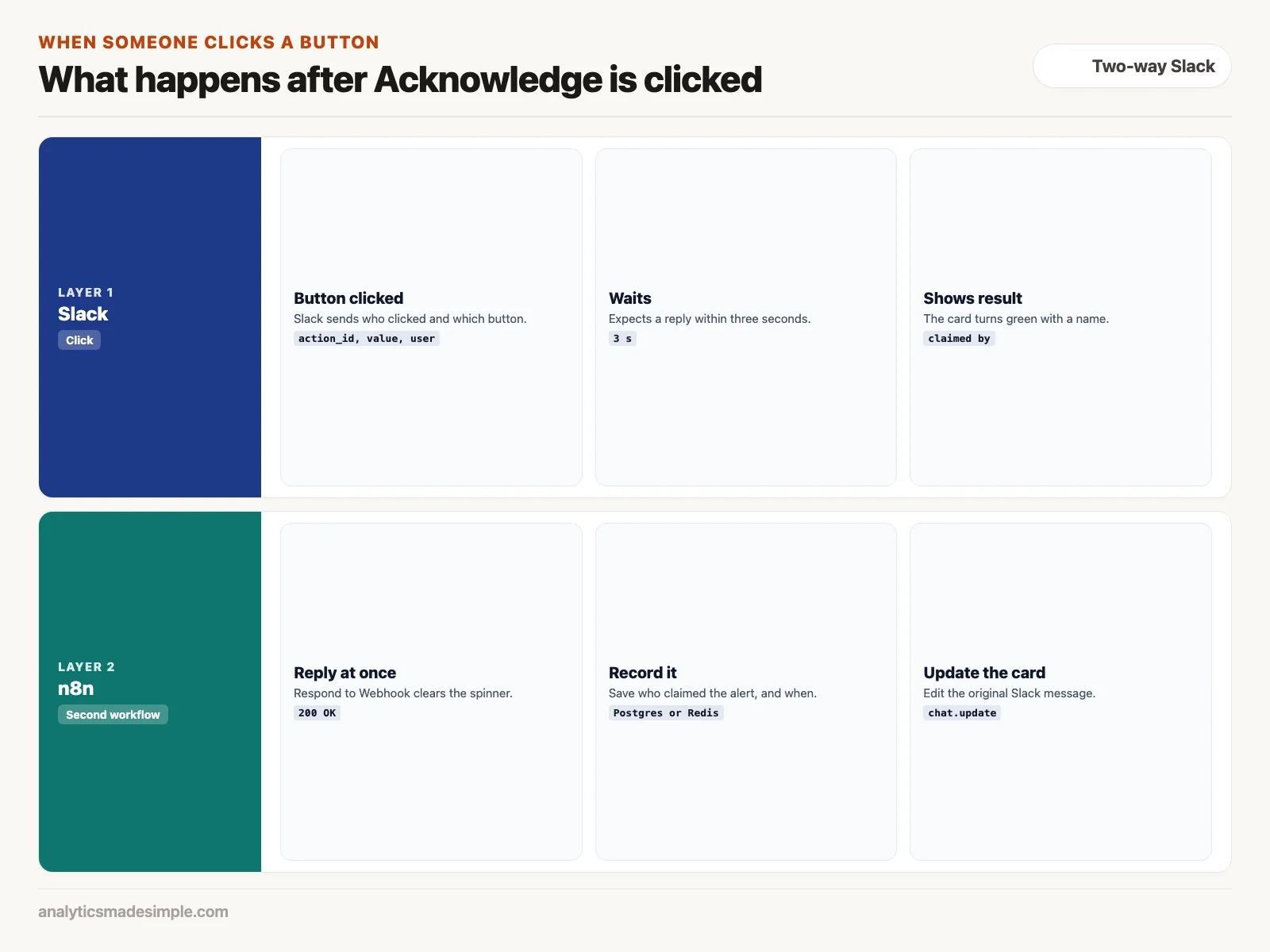
- Reply at once: A Respond to Webhook node answers right away, so the button stops spinning.
- Record the claim: A step saves who clicked and when, in a database, so nobody is reminded twice.
- Update the card: The workflow edits the original message to show who is handling it, so the whole channel can see.
For more detail, a button can instead open a modal, a small pop-up form inside Slack, with fields such as the reason for the severity and a list of approved fixes. Before running any fix, the workflow should check that the person who submitted it is allowed to.
What to do next
- Find your muted channels: Ask your team which alert channels they have muted, and list the alert types that fill them, because those are where triage pays off first.
- Add repeat skipping: Build a test workflow with the Code node above, store each fingerprint, and skip repeats within five minutes, so one problem means one message.
- Design the card: Use Slack’s Block Kit Builder to lay out a card, then map the normalized fields into it.
The next post covers adding AI steps to n8n and Zapier workflows safely.
Series notes
This is Part 6 of Automation platforms from scratch. Previous: n8n hosting. Next: adding AI carefully.
Sources
- n8n documentation: the Code node and the Webhook node.
- Slack documentation: Block Kit and handling user interaction.
- Beyer, Jones, Petoff, and Murphy, Site Reliability Engineering: How Google Runs Production Systems (O’Reilly, 2016). sre.google
Keep going
Same lessons in your feed
Short diagrams, hooks, and weekly tutorials on Substack, Instagram, X, and Facebook.



