
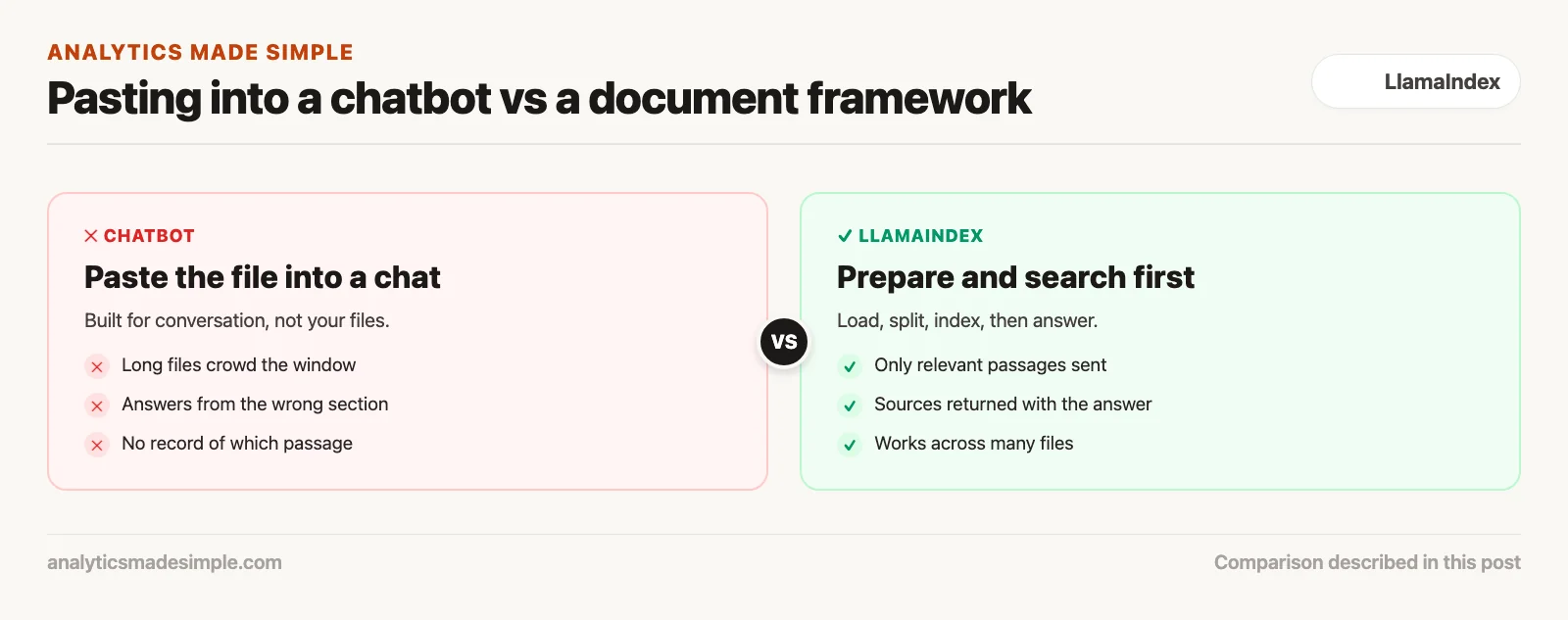
LlamaIndex is a free toolkit for the Python programming language that helps an AI answer questions from your own files. It loads your documents, cuts them into short passages, makes them searchable, and hands the best passages to the AI before it answers. It is not a chat app. Think of the chat window as the front desk and LlamaIndex as the filing system behind it.
Imagine you want an assistant that answers questions from your company handbook. You paste a long fee schedule into a chat window, and the AI answers from the wrong section, or the file is too big to paste at all. What is missing is not a smarter AI but a way to find the right page first.
Why a chatbot is not a filing system
A chatbot is built for conversation. LlamaIndex is built to prepare and search your documents before the conversation starts. When you use ChatGPT or Claude, it feels like one tool, but three separate things are working together.
- The chat window: the screen, your message history, and your login.
- The model: the AI that reads text and writes the reply.
- The document layer: the code that loads files, cuts them into passages, makes them searchable, and picks which passages the model sees.
When teams build their own document assistant, most of the work is in that third layer, not in the wording of the prompt. How do you get clean text out of a scanned PDF without scrambling its tables? How do you cut a long manual into pieces without splitting an instruction in half? How do you search by meaning rather than exact words, and show which document and page an answer came from?
LlamaIndex was built for exactly that layer. It started in 2022 as an open-source project by Jerry Liu, first named after OpenAI’s GPT models (the ones behind ChatGPT) and later renamed, and it is now one of the common toolkits for retrieval-augmented generation (RAG), where an AI looks things up before it answers.
The four stages, from files to answers
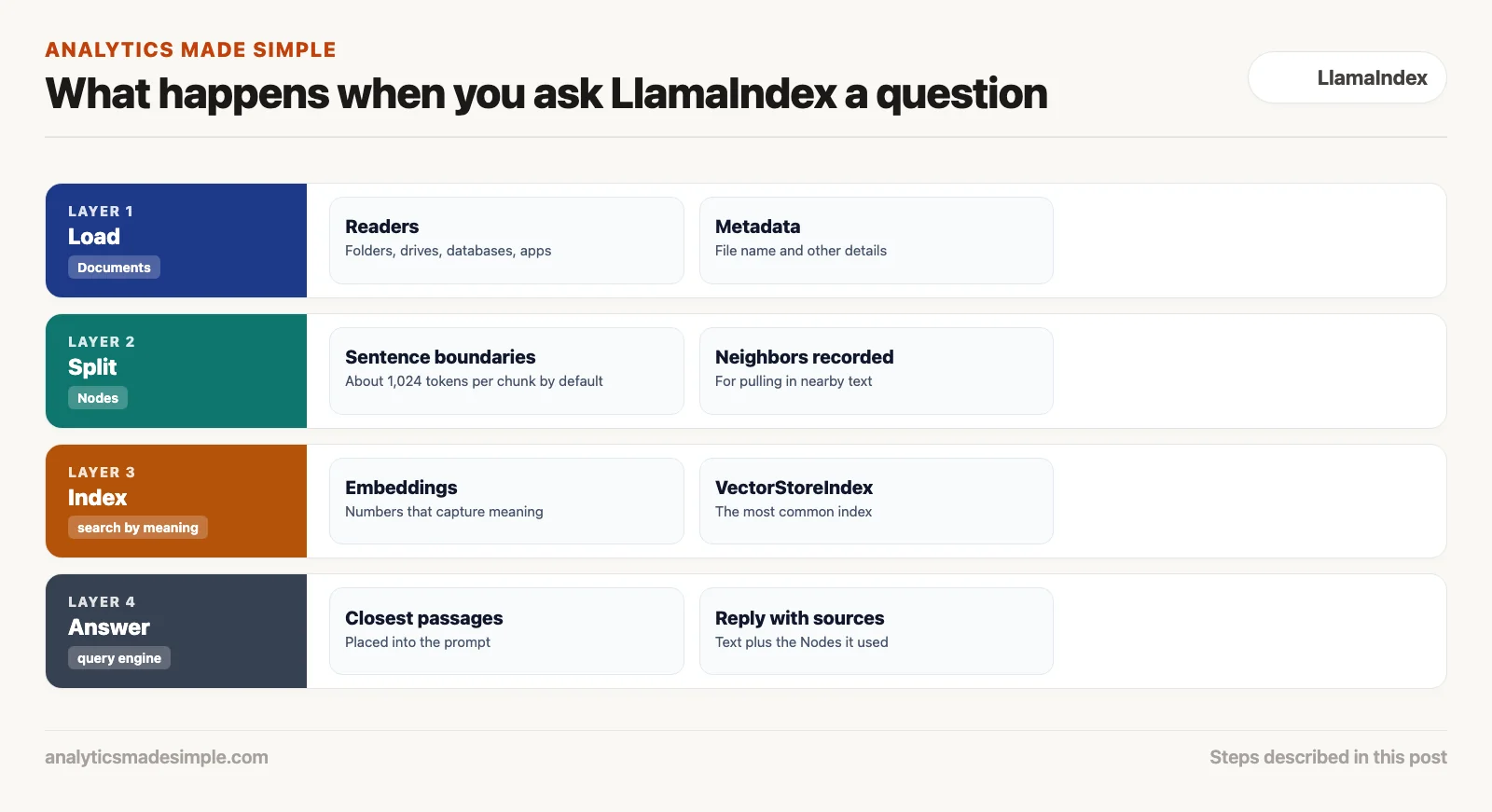
LlamaIndex works in four stages: load the files, split them into short passages, build a searchable index, and answer questions from it. Each stage is a separate step you can inspect and change.
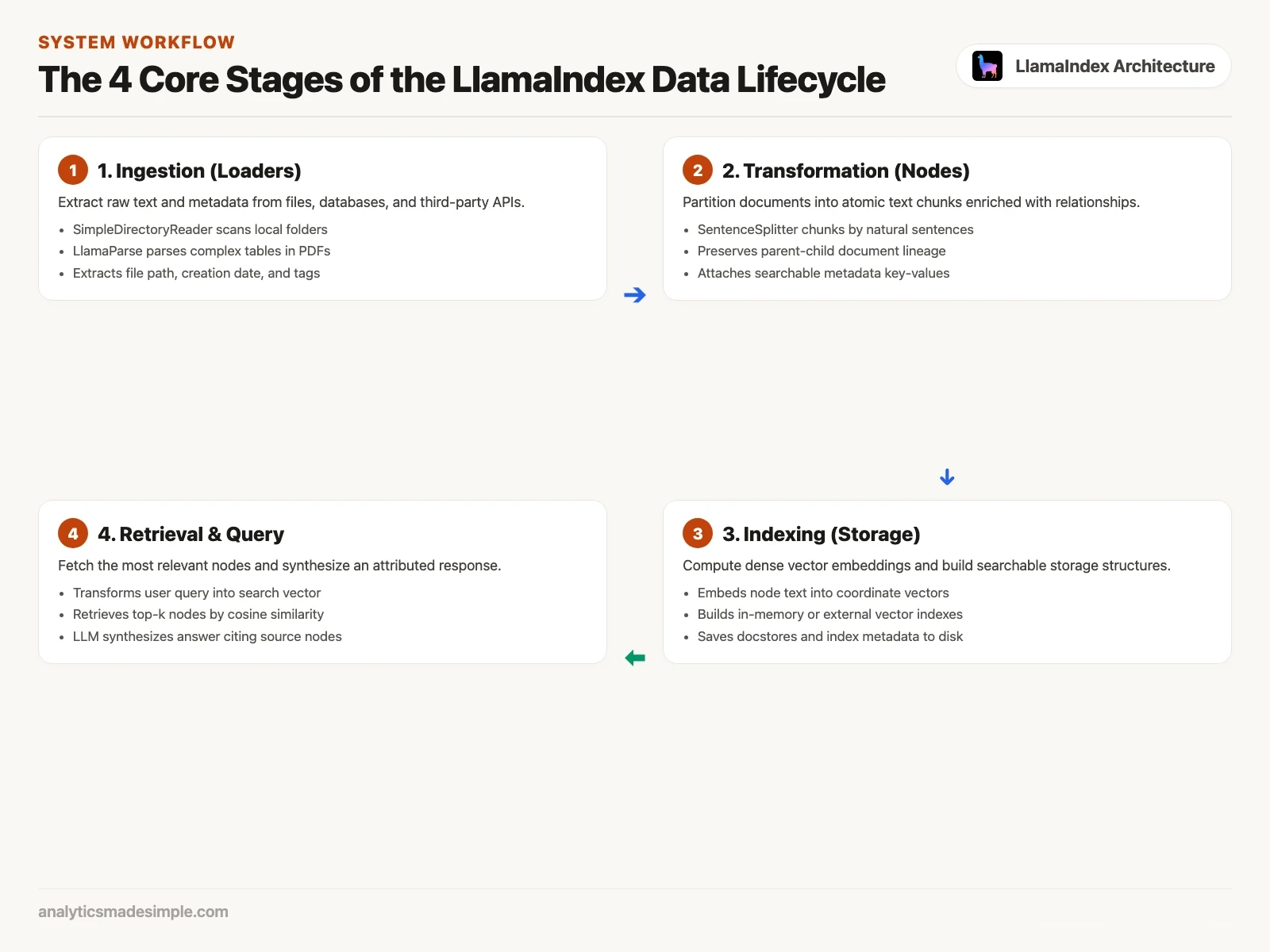
- Load: a reader pulls in your files from a folder, a cloud drive, a database, or an app, and turns each one into a Document that holds the text plus details such as the file name and date. LlamaHub lists hundreds of ready-made readers.
- Split: long documents are cut into short passages called Nodes. The default splitter cuts at sentence boundaries into chunks of about 1,024 tokens (small pieces of text), roughly 770 words, and each Node remembers which Document it came from.
- Index: each Node is turned into an embedding, a list of numbers that captures what the passage means, and stored so it can be searched by meaning. The store can be in memory or a vector database (a database that finds text by meaning) such as Chroma, Pinecone, or pgvector.
- Answer: when someone asks a question, LlamaIndex finds the closest Nodes, puts them into the prompt, and asks the model to answer from them.
The four building blocks
Four objects do most of the work: Documents, Nodes, the index, and the query engine. Learn these four names and most LlamaIndex code becomes readable.
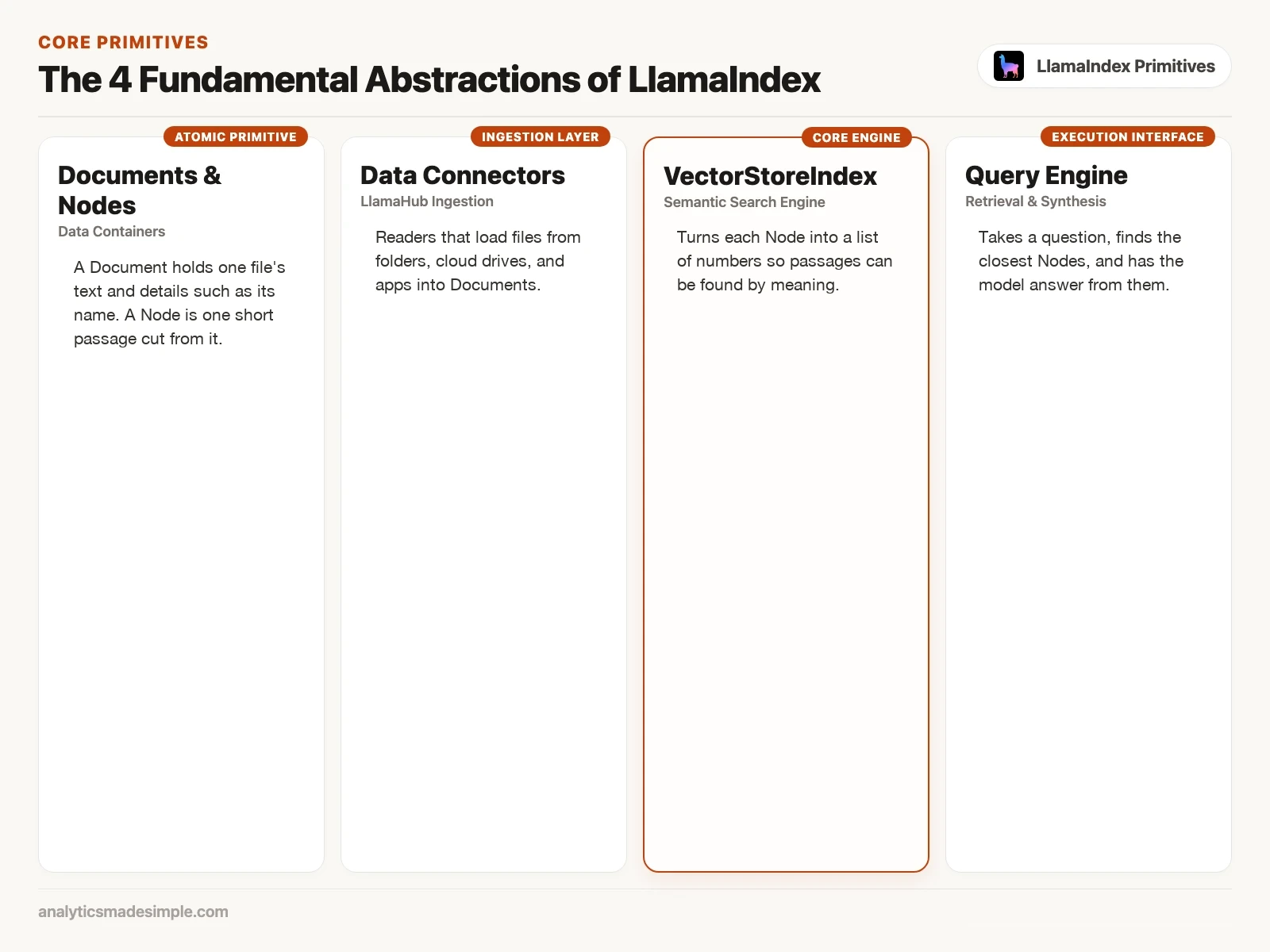
- Document: one file’s text plus a small set of details about it, such as the file name.
- Node: one short passage from a Document. It also records its neighbors, so a smarter search can pull in the surrounding text when only one sentence matched.
- Index: the searchable structure built over the Nodes. The most common is
VectorStoreIndex, which searches by meaning. - Query engine: the part you ask questions. It finds the relevant Nodes and has the model write the answer from them.
LlamaIndex or LangChain?
Use LlamaIndex when your main job is finding the right passage in a lot of documents. LangChain is a broader toolkit for chaining AI steps and tools together. The two overlap more each year, and many teams use LlamaIndex for search and plug it into a LangChain workflow.
| Architectural Dimension | LangChain | LlamaIndex |
|---|---|---|
| Primary Focus | General agent orchestration, tool calling, and prompt chains | Data ingestion, chunking, indexing, and advanced RAG retrieval |
| Core Data Primitive | Generic prompt chains and runnable pipelines | Structured Document and relational Node objects |
| Parsing Engine | Basic text splitters and external loader integrations | Specialized node parsers and enterprise OCR via LlamaParse |
| Retrieval Sophistication | Standard similarity and retriever wrappers | Hierarchical, auto-merging, recursive, and hybrid search pipelines |
| Best Used For | Building multi-step autonomous agents that execute API actions | Building high-precision search engines over private documents |
Your first LlamaIndex script
A short Python script can load a folder of files, build an index, and answer a question while showing which files the answer came from. Before you run it, install LlamaIndex with pip install llama-index, set an OpenAI API key, the secret code that links your code to your account (LlamaIndex uses OpenAI’s models by default, so this costs a small amount per run), and put a few text or PDF files in a folder called company_handbook.
import os
from llama_index.core import SimpleDirectoryReader, VectorStoreIndex

# Needs: pip install llama-index, an OPENAI_API_KEY in your environment,
# and a folder named company_handbook with a few text or PDF files in it.
if not os.environ.get("OPENAI_API_KEY"):
    raise SystemExit("Set OPENAI_API_KEY first; LlamaIndex uses OpenAI by default.")

# 1. Load every file in the folder as Document objects
documents = SimpleDirectoryReader("./company_handbook").load_data()
print(f"Loaded {len(documents)} documents.")

# 2. Build the index (this splits the documents into Nodes and embeds them)
index = VectorStoreIndex.from_documents(documents)

# 3. Create a query engine that retrieves the 2 closest Nodes
query_engine = index.as_query_engine(similarity_top_k=2)

# 4. Ask a question in plain language
response = query_engine.query("How many days ahead must I request vacation?")

# 5. Print the answer and the files it came from
print("\n--- Answer ---")
print(response.response)

print("\n--- Sources ---")
for idx, node in enumerate(response.source_nodes, 1):
    file_name = node.metadata.get("file_name", "Unknown")
    score = node.score if node.score is not None else 0.0
    print(f"[{idx}] {file_name} | similarity {score:.4f}")
The script prints how many files it loaded, the answer, and the files the answer was drawn from. The last part is what makes this different from a plain chat reply: you can open those files and check the answer yourself. By default the query engine retrieves the 2 closest passages, which is why the script sets similarity_top_k=2 explicitly.
| What it prints | What it tells you |
|---|---|
Loaded N documents. | How many files the reader loaded. If it says 0, the folder path is wrong. |
--- Answer --- | The model’s answer, written from the two retrieved passages. |
[1] file name | similarity 0.xx | The file each passage came from and how close it was to the question. Open that file and check the answer yourself. |
What happens inside one question
One call to query_engine.query() runs four steps behind the scenes: it turns your question into numbers, finds the closest passages, wraps them in a prompt, and asks the model for an answer.
- Turn the question into numbers: the same embedding model that indexed your files converts your question.
- Find the closest passages: it compares the question with every Node and keeps the closest ones.
- Build the prompt: it places those passages into a template that tells the model to answer from the context provided, not from memory.
- Answer: the model writes the reply, and you get back the text plus the source Nodes it used.
When to use LlamaIndex, and when not to
Use LlamaIndex when you want to search or ask questions across many documents, such as PDFs, wikis, or support tickets. Skip it when your question is about numbers in a clean table, or when you only need to summarize one short piece of text.
- Good fit: a help assistant over your product docs, a search tool for internal policies, or a checker that finds which contracts mention a clause. It is most useful when you want control over how documents are cut up, which ones each person may search, and which sources each answer shows.
- Poor fit: total sales by region last quarter. That is a database question, so write a SQL query (SQL is the standard language for asking a database questions) against the data instead of turning a spreadsheet into embeddings. Summarizing one pasted paragraph also does not need an indexing toolkit.
A good next step: put five of your own documents in a folder, run the script above, and ask three questions you already know the answers to. Check each answer against the files it lists. That tells you quickly whether the setup finds the right passages.
Sources and technical documentation
To explore the official LlamaIndex specifications, client packages, and architecture patterns referenced in this guide, see the following documentation:
- LlamaIndex Python Framework Official Documentation: Comprehensive architecture guide, API reference, and installation manual.
- LlamaHub Data Connectors Registry: Official ecosystem catalog of 300+ data loaders, node parsers, and tool integrations.
- LlamaCloud and LlamaParse: Enterprise agentic document parsing and OCR engine documentation for complex tables and PDFs.
- LlamaIndex GitHub Repository: Open-source codebase, release changelogs, and core architectural discussions.
Series notes
This is Part 1 of LlamaIndex from scratch. Next: install and build an Ask My Folder script.
Keep going
Same lessons in your feed
Short diagrams, hooks, and weekly tutorials on Substack, Instagram, X, and Facebook.