
Qwen is a family of AI chat models made by Alibaba, and the easiest place to start is its official website, chat.qwen.ai. Before you ask it anything, pick the model yourself and check which switches are on. If web search is on by accident, it may answer from the internet instead of from your document.
Imagine 420 boxes of tent poles arrive at your warehouse with an eight-page supplier sheet in English and Chinese. You open chat.qwen.ai, leave every setting as it is, and ask for a checklist to inspect the delivery. The reply confidently lists ski pole measurements instead, because the product code sent it searching the web. The shipment gets rejected before lunch.
A tent pole shipment rejected over a search mix-up
Web search grounding in a chat interface is built for public current events, not for checking a private supplier packing sheet. If search is on and you ask about your own product code, the model treats that code as something to look up online. It ignores the document sitting right in front of it.
Leaving web search on by default is the classic first-week mistake. It is easy to assume a private chat window only uses what you typed. But on chat.qwen.ai, live web searches are turned on by default for many accounts. When your prompt contains an unfamiliar code, such as CT-POLE-4X, the search feature behind the chat box goes looking through public web pages for anything that matches those characters.
In this case, the search turned up an outdoor surplus retail catalog with cross-country ski accessories. Because the assistant was told to be helpful and thorough, it blended the ski-forum details with the warehouse request. The result read smoothly, looked like a proper inspection table, and was completely wrong for the 420 boxes sitting in the rain.
Turn the Web Search toggle off, upload the eight-page PDF supplier sheet directly into the chat’s attachment button, and run the same prompt again, and the output changes completely. The revised checklist cites the exact anodized aluminum wall thickness (0.85 mm), the four-section shock-cord tension test, and the specific replacement ferrule SKU (stock-keeping unit, the code a warehouse uses for one exact product) (CT-FER-04) listed on page 6 of the supplier invoice. That second run takes 18 seconds, and it is the version that actually lets the warehouse crew clear the dock.
Rule of thumb: If your task relies on an internal document, a private spreadsheet, or an exact company specification, turn the Web Search switch off before typing your first word.
Qwen’s home page, and other places to try it
The main official place to chat is chat.qwen.ai, also called Qwen Studio. A few other websites also let you try the models without making an account. Knowing which surface you are on changes your login requirements, where your data goes, and which model sizes you can reach.
When people mention chatting with Qwen, they usually mean one of three different web setups, and each one serves a different purpose in your first week:
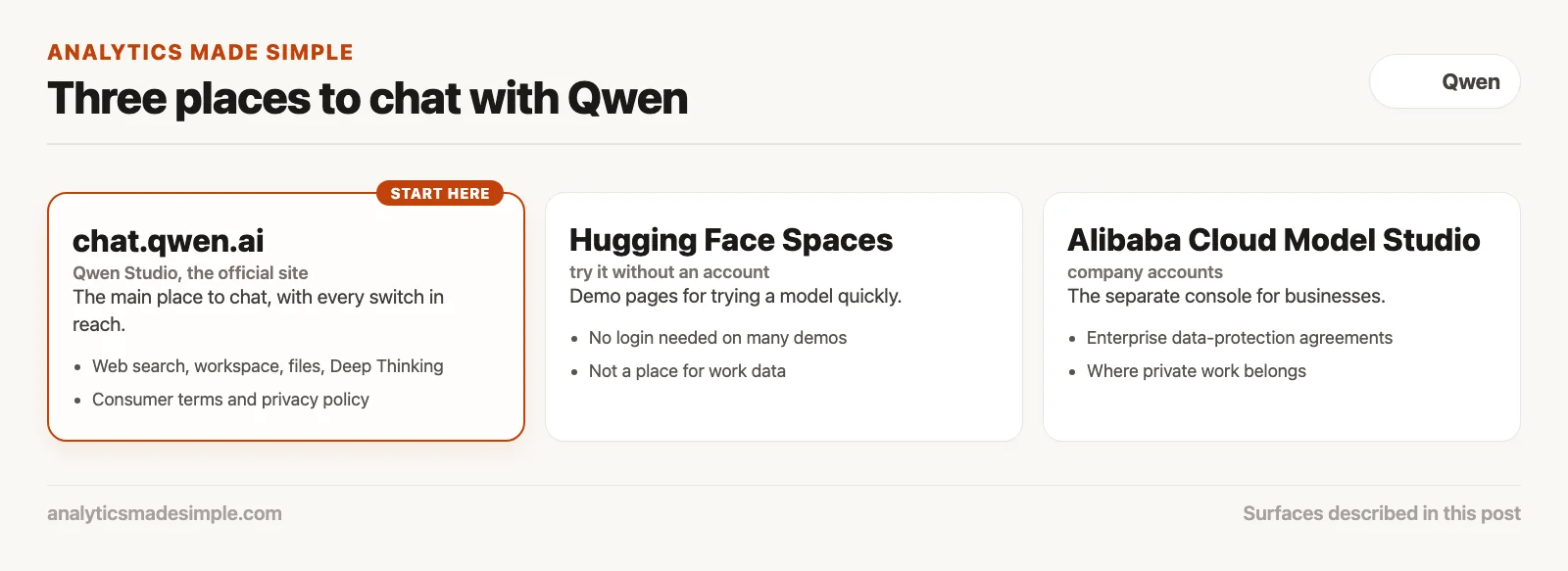
| Surface | URL / Location | Login needed? | Best for |
|---|---|---|---|
| Official Qwen Chat / Studio | chat.qwen.ai | Yes (email or phone) | Daily conversational work, file uploads, full toggle controls |
| Hugging Face Spaces | huggingface.co/spaces (Qwen org) | No (ephemeral) | Fast zero-login smoke testing and sanity checks |
| Inference Playgrounds | OpenRouter, Together, Groq cloud | Yes (developer account) | Comparing Qwen outputs side-by-side with other model families |
| Alibaba Cloud Model Studio | alibabacloud.com console | Yes (cloud billing account) | API testing and enterprise workspace tenant configuration |
For most business users, chat.qwen.ai is the right place to start. It asks you to register with an email address or a mobile phone number. Depending on where your network connection is coming from, the interface may load with Chinese navigation labels the first time. If that happens, look for the settings gear icon in the bottom-left sidebar, open the language menu, and choose English. The setting is saved for future sessions.
Maybe your company will not allow new accounts on overseas services, or you just want to test Qwen on a paragraph before signing up. In that case, go to the official Qwen page on Hugging Face instead. The team often keeps interactive demo Spaces running, where you can type prompts directly into a hosted page without a credit card or a work email. These demos time out quickly and use smaller context windows, but they work well for a five-minute trial.
Choosing between Qwen’s three model tiers
Pick Qwen-Max for multi-step reasoning, bilingual writing, and detailed document audits. Pick Qwen-Plus for everyday drafting. Save Qwen-Turbo for quick, simple sorting jobs. The dropdown picker at the top of the chat window controls which of these actually reads your prompt.
Inside chat.qwen.ai, you will see a model selector at the top of the conversation window. Alibaba changes the version numbers every few months, but the lineup stays the same:
- Qwen-Max: the flagship model, and the largest and most capable engine in the lineup. It is built for deep document parsing, complex logic, structured data output, and translation where the subtle phrasing actually matters. It streams its answer more slowly than the smaller tiers, but it makes the fewest factual mistakes when reading a dense specification.
- Qwen-Plus: the balanced workhorse. It delivers most of Max’s reasoning quality at roughly twice the speed. If you are drafting sales emails, summarizing meeting notes, or asking for general phrasing help, Plus is the practical choice that skips the longer compute wait.
- Qwen-Turbo: the lightweight speed tier, built for quick, simple text changes such as cleaning up a messy bullet list, stripping out web-page code, or sorting customer tickets into categories. Do not feed it an eight-page supplier contract; it does not have the attention span to catch fine-print contradictions.
For the tent pole job, Qwen-Max is the right call. The supplier sheet has linked tables on page 2 and a footnote on page 7 that changes a key rating. A lighter model tends to drop that footnote during extraction.
Four toggle switches that change your reply
Four interface toggles shape how Qwen Chat reads your instructions: Web Search grounding, the Artifacts side panel, file attachment parsing, and Deep Thinking mode. Leave them on their default settings without checking, and your output can drift from what you actually asked for.
Modern chat boxes are no longer simple text-in, text-out windows. They carry specialized switches along the bottom prompt bar or inside the settings panel:
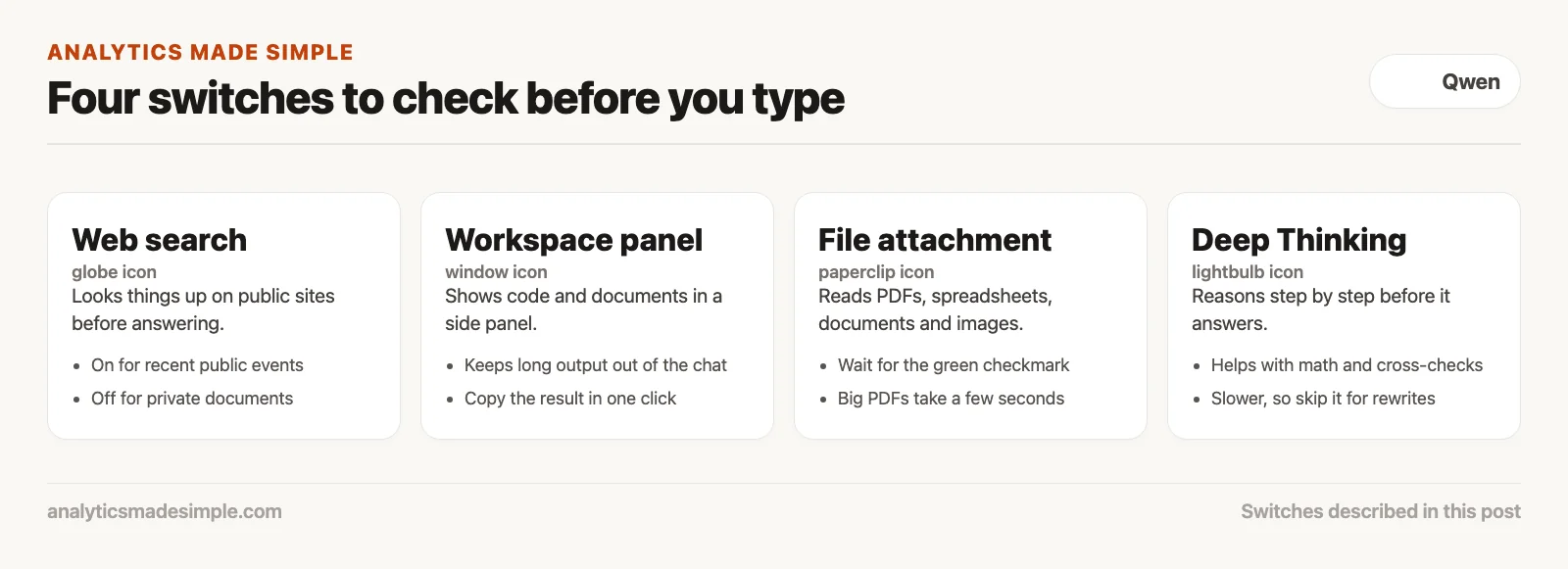
- Web Search grounding (the globe icon). When it is on, the model sends background search queries to public search engines before it writes a reply. Keep it on when you are asking about recent events, current software releases, or public market prices. Turn it off right away when you are pasting internal specs, customer lists, or private procedures, so the model does not blend public web results into your private work.
- Artifacts, or the workspace panel (the window icon). Similar to Claude’s Artifacts or ChatGPT’s Canvas, Qwen has a split-screen workspace that renders code, markdown (plain text with simple marks for headings and lists) documents, web-page previews, and interactive charts in a panel on the right. This keeps long code blocks or multi-page procedures from cluttering the conversation, and lets you copy the finished document in one click.
- File attachment parser (the paperclip icon). You can upload PDFs, spreadsheets, Word documents, and images. When you attach a file, Qwen reads the text out of it, including scanned pages, and loads the contents into what the model can see while it answers. Check that the file preview shows a green checkmark before you send your prompt; large PDFs, over about 20 megabytes, can take several seconds to process.
- Deep Thinking, or reasoning mode (the lightbulb icon). When it is on, the model works through an internal step-by-step chain of reasoning before it shows you a final answer. This helps with math checks, logic puzzles, and cross-checking numbers that seem to disagree across two tables. It also makes the reply noticeably slower, so skip it for simple rewrites.
Step by step: from login to a verified document
A reliable session takes five steps in order. Start a new chat, pick Qwen-Max, and turn off web search. Then upload the checked source file and ask a narrow question about it. Skip the bounding step and the assistant will fill in gaps with facts nobody actually wrote down.
Here is the exact routine for fixing a warehouse receiving problem like the one above. You can reuse it for any supplier sheet, contract review, or operations manual.
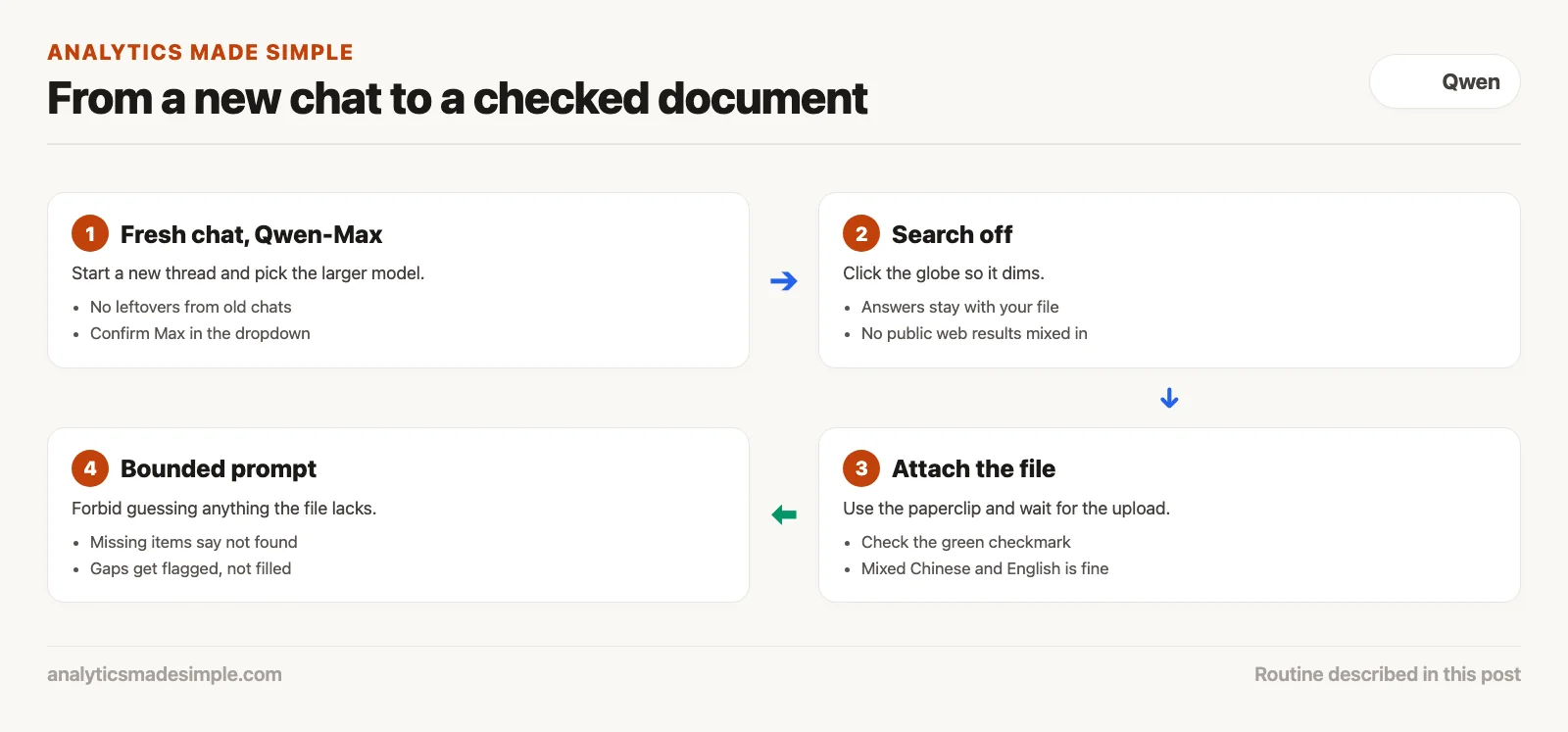
Step 1: open a fresh conversation thread. Do not reuse an old chat that already discussed a different product. Old context stays active in the model’s memory and can bleed leftover terminology into a new extraction.
Step 2: set your model to Qwen-Max. Click the model dropdown at the top of the window and confirm Max is selected. For a technical extraction with measurements, tolerances, and multi-lingual tables, the larger model is worth the wait.
Step 3: turn off Web Search grounding. Click the globe or search icon next to the prompt box to switch it off. The icon should dim or show a line through it. This keeps the model’s knowledge limited to what it already learned plus your uploaded file.
Step 4: attach your source document. Click the paperclip icon and choose your file, then wait for the upload bar to finish. If your document mixes Chinese and English text, Qwen’s bilingual training handles both languages without any pre-translation on your part.
Step 5: run a bounded prompt with a clear “do not guess” rule. A vague prompt invites the model to fill gaps on its own. Use a structured template that explicitly forbids guessing missing information. Here is the exact prompt structure that produces a verified warehouse checklist:
Role: Warehouse Receiving Specialist.
Task: Create a 1-page inspection checklist for the loading dock crew based strictly on the attached supplier document for SKU CT-POLE-4X.

Constraints:
1. Extract all physical dimensions, material grades, and tolerances exactly as stated on pages 2 through 5.
2. Include the shock-cord elasticity test from Section 4.2.
3. If any specification or test procedure is NOT explicitly written in the attached document, write "SPECIFICATION NOT FOUND" in bold.
4. Do NOT search external sources or assume standard industry measurements.
5. Format the output as a Markdown table with three columns: Inspection Point, Required Standard, and Pass/Fail Checkbox.
Telling it to write “specification not found” for missing items stops it from inventing a standard size. If the supplier left out the carton crush rating, the checklist flags the gap right away instead of guessing a number.
A three-bucket test for workplace data
Sort work text into three groups before you paste it into chat.qwen.ai. Public text is fine to paste. Internal templates need names and numbers removed first. Private records should never go into a public website at all. Anything you send to a public cloud chat leaves your company’s own network.
Because Qwen is built by Alibaba Cloud, conversations on chat.qwen.ai run on remote servers governed by Alibaba’s consumer terms of service and privacy policy. Alibaba does offer enterprise data-protection agreements through its separate Cloud Model Studio console, but the free consumer chat is not an approved place to store regulated business secrets.
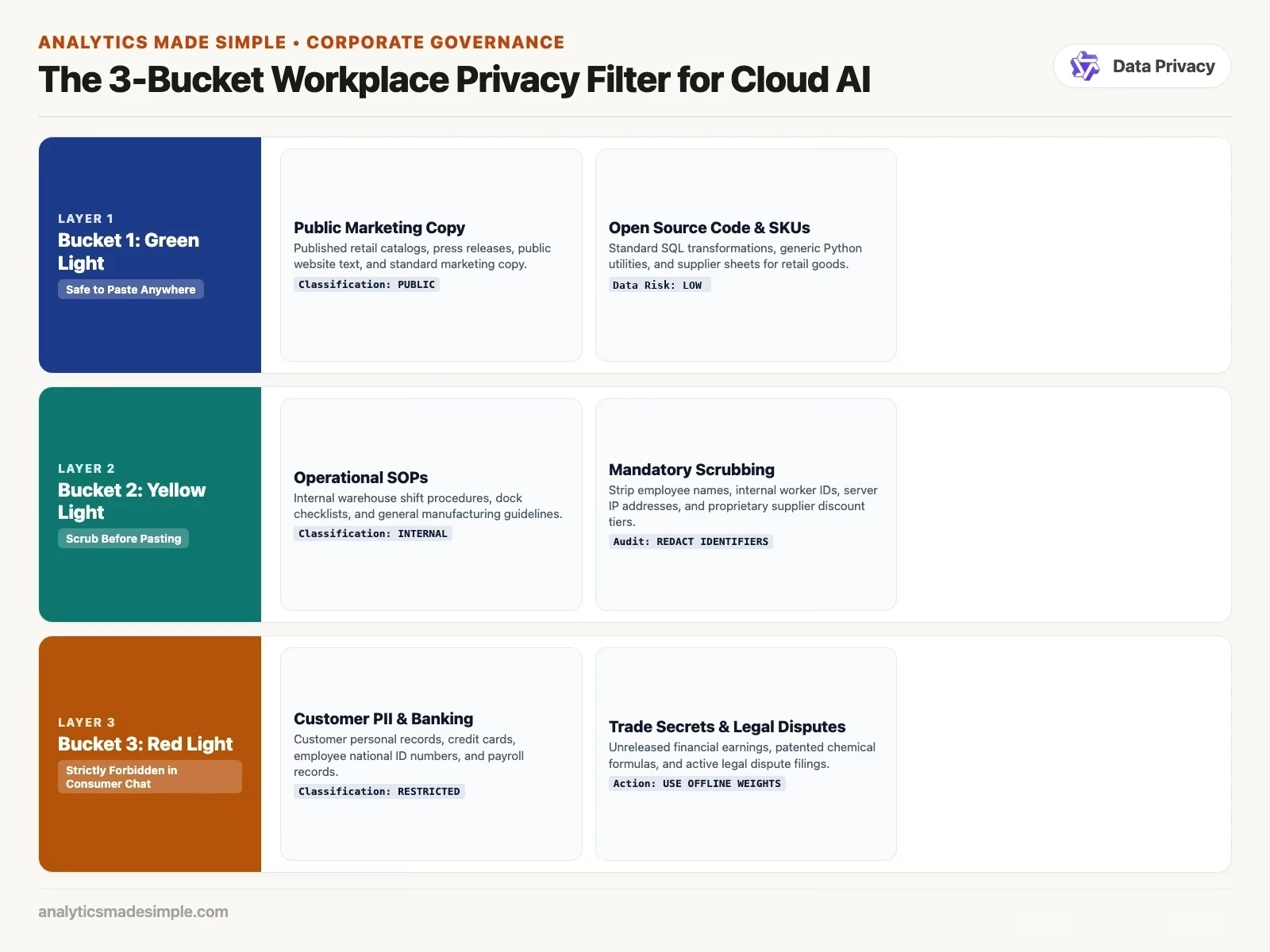
- Bucket 1, safe to paste: public marketing copy, published product catalogs, open-source code snippets, press releases, standard English-to-Chinese translation of public website copy, and supplier spec sheets for mass-market retail goods already on sale.
- Bucket 2, scrub first: internal warehouse procedures, training manuals, shift schedules with employee names removed, logistics templates with internal account IDs removed, and troubleshooting guides. Strip out internal network addresses, supplier contract pricing, and proprietary vendor names before you upload.
- Bucket 3, never paste: customer personal information, employee Social Security or national ID numbers, unreleased quarterly financial results, trade-secret manufacturing formulas, health records, and legal dispute filings. If your task touches bucket 3 data, use a company account with its own signed privacy terms. Or run a downloadable Qwen model fully offline on your own computer, which the next post covers.
A tent pole spec sheet falls squarely into bucket 1 and bucket 2. The physical dimensions of an aluminum pole are not a trade secret, and the supplier’s invoice prices were never part of the prompt in the first place. Running this three-bucket filter takes about 10 seconds and protects your organization from an embarrassing leak.
Closing the browser tab with clean specs
Starting with Qwen in your day-to-day work does not require an engineering degree or a private server rack. It just requires a habit of checking a few settings in a normal browser tab. Leaving Web Search on can return ski pole instructions for a tent delivery. Choosing Qwen-Max, turning search off, and bounding your prompts with clear rules produces a dock inspection sheet you can actually ship, instead of hours of warehouse chaos.
Before you open your next session on chat.qwen.ai, check your settings. Choose Max for important files, turn search off when working with private documents, and keep confidential data out of public consumer chat boxes. The next post in this series looks at how well Qwen translates. It covers how the model handles technical terms across English, Chinese, and other trade languages without losing the meaning.
Series notes
This is Part 2 of Learn Qwen. Previous: what Qwen is. Next: multilingual strengths.
Sources
- Qwen Chat Portal (Official consumer and professional web chat interface)
- qwen.ai Hub (Product navigation, Studio overview, and research releases)
- Qwen Team Documentation (Model family architecture and capability overviews)
- Alibaba Cloud Model Studio (Enterprise API console and model deployment guidelines)
- Hugging Face Qwen Organization (Open-weight repositories, model cards, and interactive Spaces demos)
Keep going
Same lessons in your feed
Short diagrams, hooks, and weekly tutorials on Substack, Instagram, X, and Facebook.



