
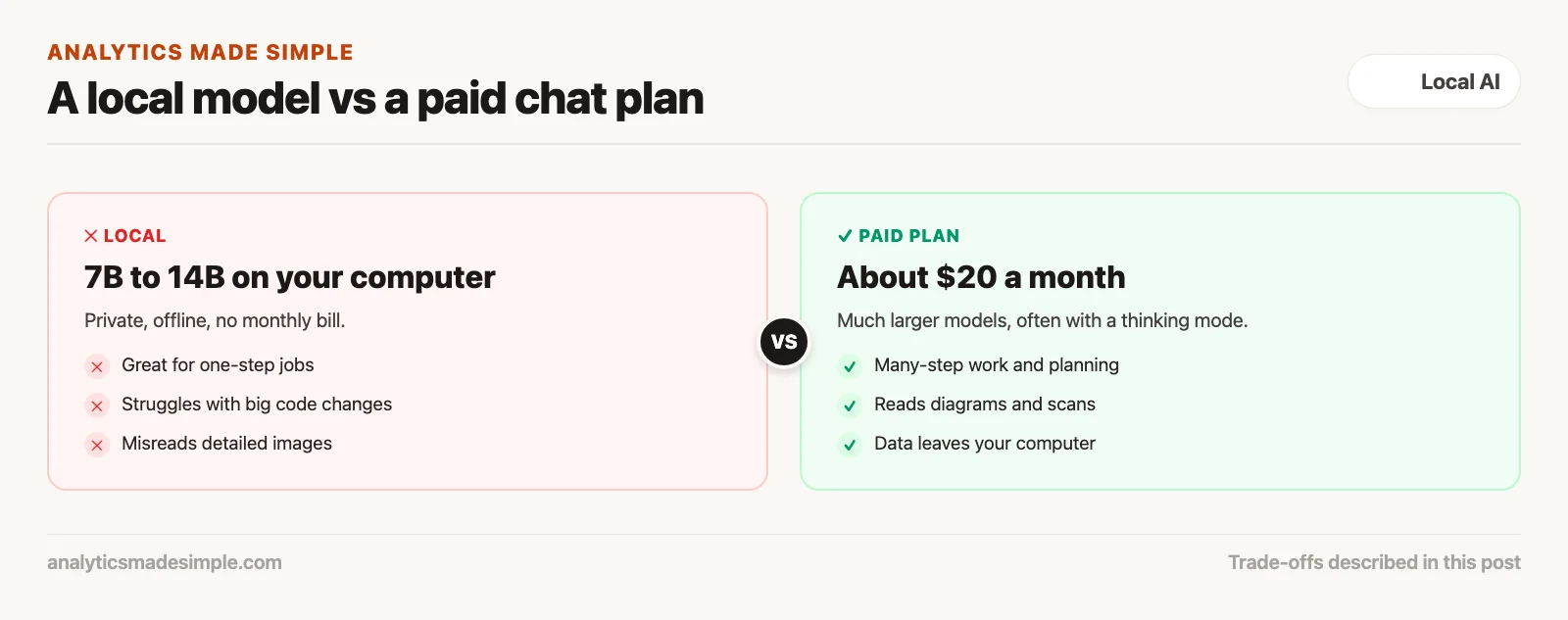
A model on your own computer wins for private data, working offline, and large piles of routine text. A paid chat service, often about $20 a month, usually wins for big coding jobs, reading detailed images, and research on unusual topics. Pick the tool that fits the job, not the one that fits a belief.
Imagine someone at your company proposes canceling everyone’s paid AI chat plans to save money, and using only free models on your own computers. Before you agree, you test both on real work. The local model handles emails and summaries well. But it stumbles on a large code change across many files and misreads a detailed diagram. So you keep both.
Why “run everything locally” falls short
Local models are useful, but they are smaller than the big online models. Some jobs need what only the bigger ones can do.
If your team already uses local models for private work, it is tempting to go further and drop paid plans entirely. For a fifty-person team at about $20 per person a month, that saves around $12,000 a year. Prices change; Claude Pro, for example, costs $20 a month billed monthly on Anthropic’s pricing page (checked October 4, 2026).
But when you compare them on real work, a few gaps usually show up:
- Big code changes. A small local model can lose track of a change that spans many files. It may call functions that do not exist or break something that used to work. A top online model is much more likely to keep the whole project in mind.
- Reading diagrams and screenshots. Local models that read images often misread small labels and lines in a detailed diagram. Top online models read them far more reliably.
- Research on unusual topics. Ask a small model about a narrow legal question, and it may invent sources that sound real. Big online models know more, and many can search the web.
A small model packs a lot into a file that fits on a laptop, but something has to give. To choose well, you need to know where each kind of tool is strong.
How far a model can think ahead
Small models are good at one-step jobs. Jobs that take many connected steps are where big online models pull ahead.
Small models, like Qwen3.5 9B or Gemma 4 E4B, are good at jobs that stand on their own: rewriting an email, summarizing a short transcript, or explaining one database query. Those take only a step or two.
A lot of real work takes many steps that depend on each other:
- Planning first: weighing a few options, picking one, and only then starting.
- Catching a mistake halfway: noticing that an earlier choice will not work, going back, and fixing it.
- Keeping many parts in sync: changing one file while making sure four related files still match.
Many top online models now have a thinking mode. Before answering, they spend extra time working through the problem and checking their own work. They are also far larger than anything that fits on a laptop, so they know much more.
The difference in time adds up. If a small model costs an engineer an extra couple of hours a week in fixing its mistakes, that time is worth far more than a $20 monthly plan. Do the math with your own team’s pay and hours.
Reading images: where the gap is widest
Much work comes as pictures: diagrams, screenshots, and scanned documents. Big online models read them far better than local ones.
Real problems often arrive as images: a system diagram, a scanned contract, a screenshot of a dashboard, or a design mockup.
As of October 2026, many small local models read images, including Gemma 4, Qwen3.5, and Ministral 3, per their model cards. But on a normal computer, they face trade-offs:
- Images often get shrunk. To fit in limited memory, many local models shrink each image first. Small labels blur, arrows disappear, and table lines merge.
- Exact values slip. A local model can tell a chart is there, but may misread the actual numbers on it.
- Long documents run out of room. A thirty-page report full of charts can fill up a local model’s memory, so you end up splitting it by hand.
Top online models run on huge computers. They take in full-size images, catch small details, and can turn a diagram into working code. If your work involves many diagrams or scans, a local model will slow you down.
The real cost of “free” local AI
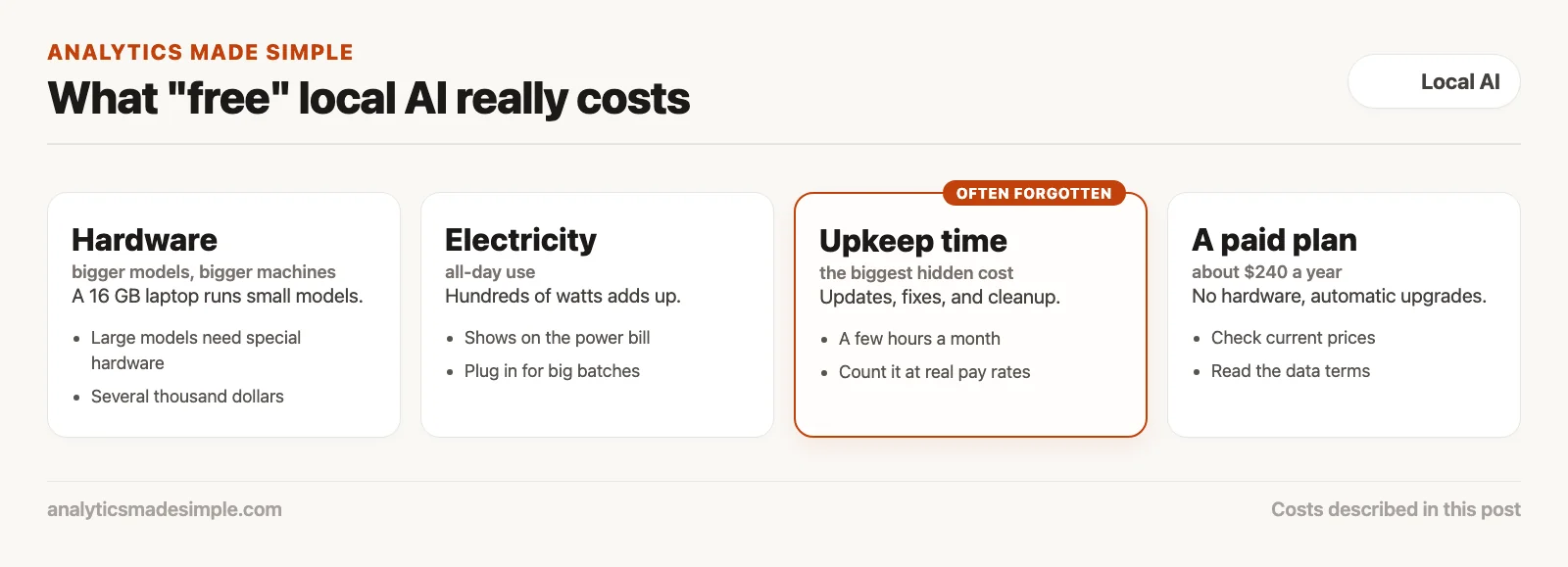
A local model has no monthly bill, but it still costs money: hardware, electricity, and the time people spend keeping it running.
Here is what running capable local models really costs, compared with a paid plan:
- Hardware. A normal laptop with 16 gigabytes of memory runs small models fine. Bigger models need special hardware, like a Mac Studio with lots of memory or a PC with two high-end graphics cards. Either can cost several thousand dollars.
- Electricity. A powerful computer running AI all day can draw several hundred watts, which shows up on the power bill.
- Aging hardware. AI moves fast. A graphics card from two years ago may not support newer features, so you may need to upgrade.
- Upkeep time. This is the biggest hidden cost. Someone has to update software, fix broken setups, and clean up old model files. Even a couple of hours a month adds up over a year.
A $20 plan costs about $240 a year, with no hardware to buy, nothing to maintain, and automatic upgrades to newer models. Add it all up, and local models come out ahead mainly when you use them heavily every day, or when rules require that data stay in-house.
A simple way to decide, job by job
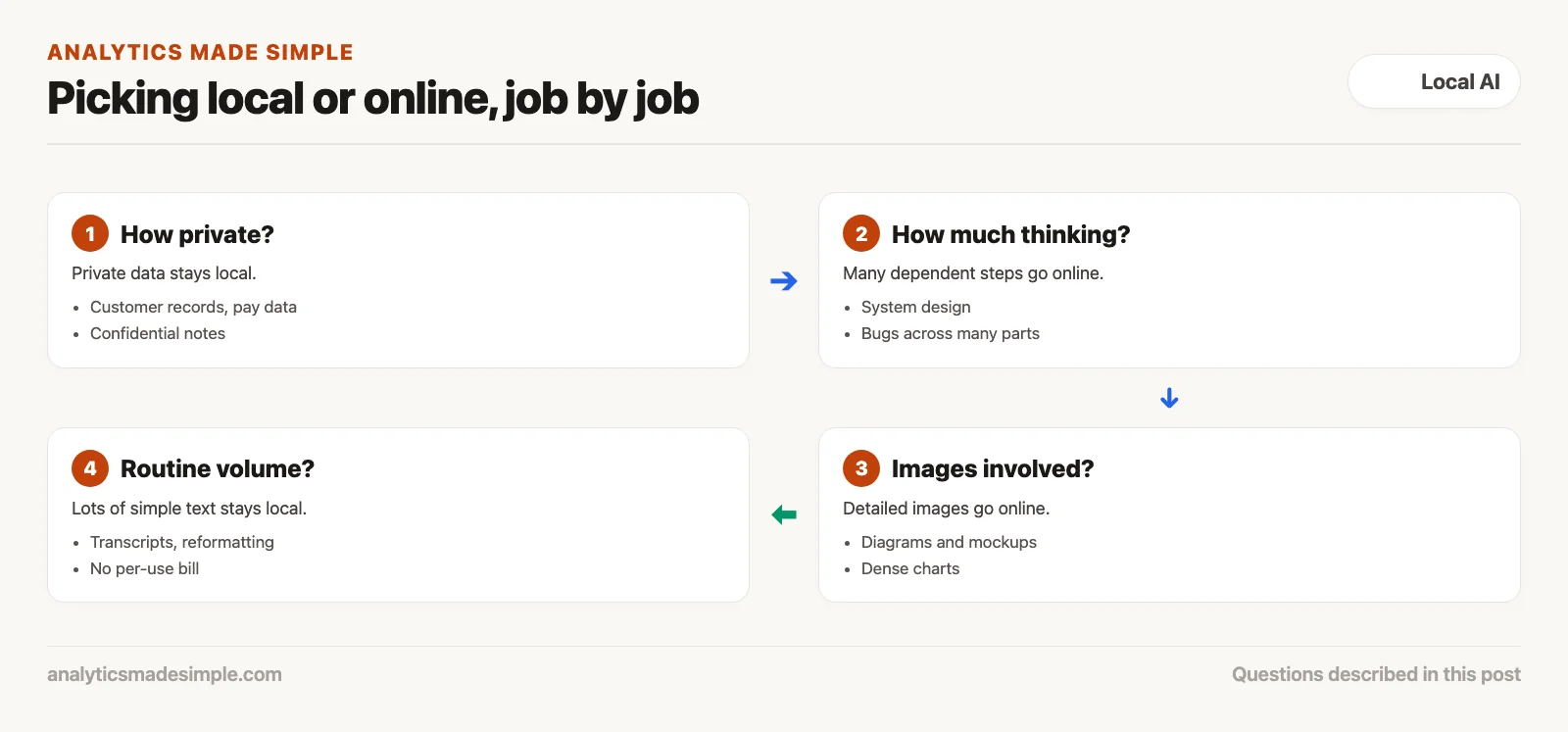
Sort each job by two questions: how private is the data, and how much thinking does it need? The answer usually picks the tool for you.
- Private and simple: go local. Examples: removing personal details from customer records, reviewing pay spreadsheets, or summarizing confidential notes. Keeping the data in-house matters more than a small drop in quality.
- Complex, many steps: go online. Examples: designing a new system, tracking down a bug that spans many parts, or reviewing a very large code change. Use a top paid model with a thinking mode.
- Detailed images: go online. Examples: turning a diagram into a database design, reading a dense chart, or reviewing a design mockup. Local image models are not reliable enough yet.
- Lots of routine text: go local. Examples: cleaning up transcripts, reformatting text, checking grammar, sorting thousands of log lines, or drafting a reply on a plane. These need little thinking, and running them locally saves your paid plan’s limits.
Building a mixed setup
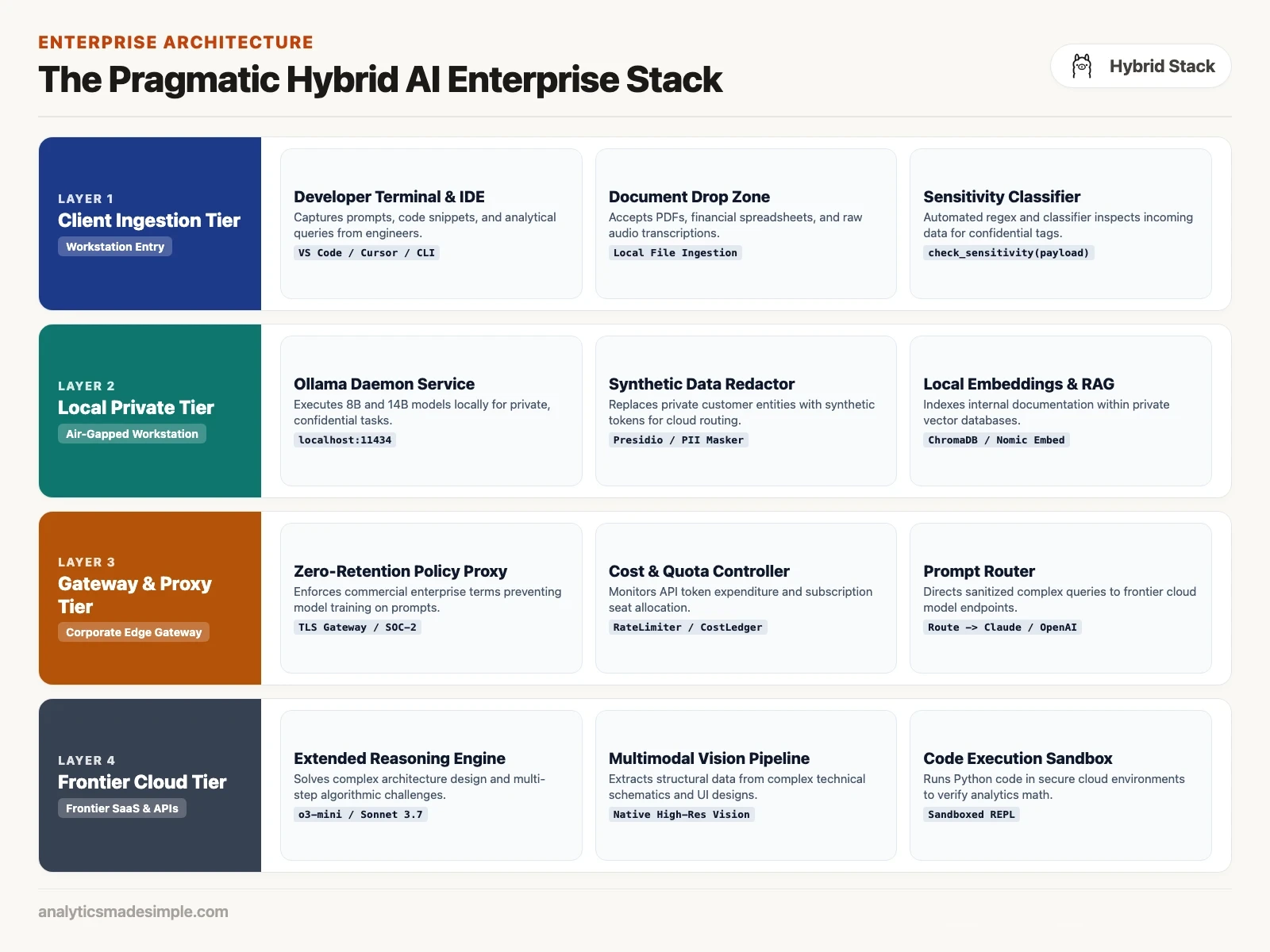
Instead of leaving the choice to each person, you can add a simple router: a small program that reads each request and sends it to the right place.
The Python program below shows the idea. It looks for signs that a request is private, sends those to Ollama on your own computer, and sends complex requests to an online model:
import os
import re
import json
from openai import OpenAI

# Configure local and cloud client interfaces
local_client = OpenAI(
    base_url="http://127.0.0.1:11434/v1",
    api_key="local-daemon"
)

cloud_client = OpenAI(
    api_key=os.environ.get("OPENAI_API_KEY", "sk-cloud-token")
)

CONFIDENTIAL_PATTERNS = [
    r"\b\d{3}-\d{2}-\d{4}\b",  # SSN
    r"\b4[0-9]{12}(?:[0-9]{3})?\b",  # Credit Card
    r"\b(confidential|proprietary|nda|salary|acquisition|patent)\b"
]

def classify_data_sensitivity(text: str) -> bool:
    """Return True if text contains confidential markers or PII."""
    for pattern in CONFIDENTIAL_PATTERNS:
        if re.search(pattern, text, re.IGNORECASE):
            return True
    return False

def route_and_execute_task(system_prompt: str, user_prompt: str, requires_vision: bool = False):
    is_confidential = classify_data_sensitivity(user_prompt) or classify_data_sensitivity(system_prompt)

    # Rule 1: All confidential data must remain local
    if is_confidential:
        print("[ROUTER] Confidential data detected -> Enforcing LOCAL execution")
        response = local_client.chat.completions.create(
            model="qwen3.5:27b-q4_K_M",
            messages=[
                {"role": "system", "content": system_prompt},
                {"role": "user", "content": user_prompt}
            ],
            temperature=0.1
        )
        return {"target": "local", "output": response.choices[0].message.content}

    # Rule 2: High-complexity reasoning and vision route to frontier cloud
    is_complex_code = len(user_prompt.split()) > 400 or "refactor" in user_prompt.lower()
    if requires_vision or is_complex_code:
        print("[ROUTER] Complex reasoning / Vision detected -> Dispatching to FRONTIER CLOUD")
        response = cloud_client.chat.completions.create(
            model="gpt-6.1-sol",
            messages=[
                {"role": "system", "content": system_prompt},
                {"role": "user", "content": user_prompt}
            ]
        )
        return {"target": "cloud", "output": response.choices[0].message.content}

    # Rule 3: Routine, non-sensitive text tasks execute locally to conserve cloud quotas
    print("[ROUTER] Standard text task -> Executing LOCALLY on workstation")
    response = local_client.chat.completions.create(
        model="qwen3.5:9b-q4_K_M",
        messages=[
            {"role": "system", "content": system_prompt},
            {"role": "user", "content": user_prompt}
        ],
        temperature=0.2
    )
    return {"target": "local", "output": response.choices[0].message.content}

if __name__ == "__main__":
    sample_task = "Summarize this meeting transcript and extract three action items."
    result = route_and_execute_task("You are an executive assistant.", sample_task)
    print(f"Completed via {result['target']}: {result['output'][:100]}...")
With a setup like this, you keep paid plans for the people who need deep reasoning and image reading every day. Meanwhile, private, high-volume work runs on local computers, with no data leaving the building and no per-use bill.
Common questions
Will free local models catch up? They keep closing the gap with older top models. A good small model today is roughly as capable as the best online models from a few years ago. But the top online models keep improving too, so they stay ahead of what a laptop can run.
Can a local model clean data before it goes online? Yes, and this works well. A local model can swap names, phone numbers, and company names for placeholders, like “Company_A.” The cleaned text goes to an online model for the hard thinking, and the real names go back in afterward.
What is the least hardware worth using? A recent laptop with 16 gigabytes of memory runs small 7B and 8B models well. You may already own one, and it is enough for transcripts, writing help, and private data.
Do paid chat services train on my data? Personal plans may use your chats for training unless you turn that off in the settings. Business plans generally do not train on your data by default. Read each provider’s current data terms before you share anything sensitive.
Use both, on purpose
Local AI is not all-or-nothing. It is one useful tool among several.
Use local models for privacy, working offline, fast answers, and unlimited experiments on your own hardware. Use paid online models for the hardest thinking, reading images, and large projects. Learn to use both well, and you get the best of each.
Your next step
List your team’s AI tasks for one week and mark each one private or not, and simple or many-step. Send private, simple work to a local model and keep the rest on your paid plan for a month. Comparing the two lists afterward shows whether the mix saves money without costing quality.
Sources
- Anthropic, Claude pricing, checked October 4, 2026.
- OpenAI, models in the API documentation, checked October 4, 2026.
- Ollama, qwen3.5 tags, checked October 4, 2026.
- Model cards: Gemma 4, Qwen3.5-9B, and Ministral 3 8B, checked October 4, 2026.
Series notes
This is Part 9 of Local LLMs from scratch, and it closes the planned local track. Previous: keeping models updated.
Keep going
Same lessons in your feed
Short diagrams, hooks, and weekly tutorials on Substack, Instagram, X, and Facebook.