DeepSeek’s official chat app is free on the web and on phones (as of September 2026, at chat.deepseek.com), so a checkout page selling “DeepSeek Plus” for $19 a month is almost certainly not from DeepSeek. The only thing DeepSeek charges for is its API (the service programmers use to connect their own apps to its models), billed by how much text goes through it.
Imagine you are polishing a slide late at night, DeepSeek’s quick mode gives you a bland answer, and a browser add-on offers a $19 upgrade. You pay, assuming there must be a paid tier like ChatGPT Plus. The next morning you find the charge came from an unrelated seller, and the stronger free mode in the official app was one click away the whole time.
Names and prices move over time. According to pages checked in September 2026, consumer chat on the official web and app is free, Instant Mode maps to DeepSeek-V4-Flash, Expert Mode maps to DeepSeek-V4-Pro, and there is no official DeepSeek Plus for that chat at all. Confirm the live toggle labels the week you draft anything based on this. Do not treat this page as a permanent price list.
The $19 receipt that is not DeepSeek
Imagine a receipt lands in your email from “DS Plus Labs,” a made-up seller borrowing DeepSeek’s initials. Amount: $19.00. Descriptor: DEEPSEEK PLUS MONTHLY. The Chrome Web Store listing used the logo mark and the words “Instant felt limited.” That last phrase does the psychological work, because Instant mode really did feel limited, and slide 7 needed an executive tone, not a generic tweet. You have already seen ChatGPT Plus, Claude Pro, and Gemini Advanced sit behind a monthly credit card prompt somewhere. A $19 upgrade feels like the missing tier that must exist here too.
In this example, it is not a real product from the Hangzhou lab that actually makes DeepSeek. Copycat listings like it are why the rest of this section matters.
The official chat tab was still open behind the extension popup, on the same laptop, with the same board_pack_14.pptx file sitting nearby. The real product had never once asked for a card. According to pages checked in September 2026, DeepSeek’s consumer web and app do not sell a Plus or Pro subscription in the ChatGPT Plus shape at all. The lab instead bills its API by the token (a small chunk of text, about three-quarters of a word). Chat itself is a free seat with possible fair-use throttling during busy hours. Clone checkouts, browser extensions, and sideloaded apps fill the gap that people invent for themselves when they expect a paywall to exist.
A prompt to Instant might be one plain sentence: “Make slide 7 sound like a board deck.” The model returned four lines about “alignment” and “ownership,” with no funnel stage named, no week number, and no mention of the stalled demo-to-close step that the sheet actually showed. That kind of output can come from a small model, a lazy prompt, or both at once. Flash is the fast V4 line, with roughly 284 billion total parameters (the numbers the model learned, a rough measure of its size) and about 13 billion active, in the pages checked. Flash still works fine for plenty of jobs. The stronger mode sits right on the same page, one click away.
Expert Mode was already sitting there as a free toggle on that same page. It is easy to overlook it entirely, search Google for “DeepSeek Plus” instead, install the first extension with a Get button, and pay without thinking twice. Apple Pay makes the checkout feel like an official store, with autofill already primed and ready. The logo icon was slightly off-spec, something that only became obvious after the charge had already posted.
If a checkout titled Plus appears between you and a chat box, you have left the official site. Type chat.deepseek.com yourself, directly into the address bar. Look for Instant and Expert as your only two options. Look for a card form anywhere near them. If a card form exists on some random extension instead, close it immediately. The $19 did not buy V4-Pro access. It bought a stranger a month of whatever that extension actually billed as.
Rule of thumb: ChatGPT Plus is a real OpenAI product. DeepSeek Plus, in the pages checked, is a phrase other people print on a receipt. Do not copy the mental model across vendors.
Instant, Expert, and the free tab
Open the official chat and you get a text box for typing, a history panel, and, in the pages checked, two mode names that pick the underlying model, plus a separate thinking control that is its own switch entirely. DeepSeek’s V4 preview post from April 2026 told people to try the new line at chat.deepseek.com through Expert Mode and Instant Mode. The V4-Pro general-availability (GA) note from August 2026 said Pro is available on app and web through Expert Mode. Those two posts are the actual mapping to trust. Labels can still move over time, so read the live tab yourself.
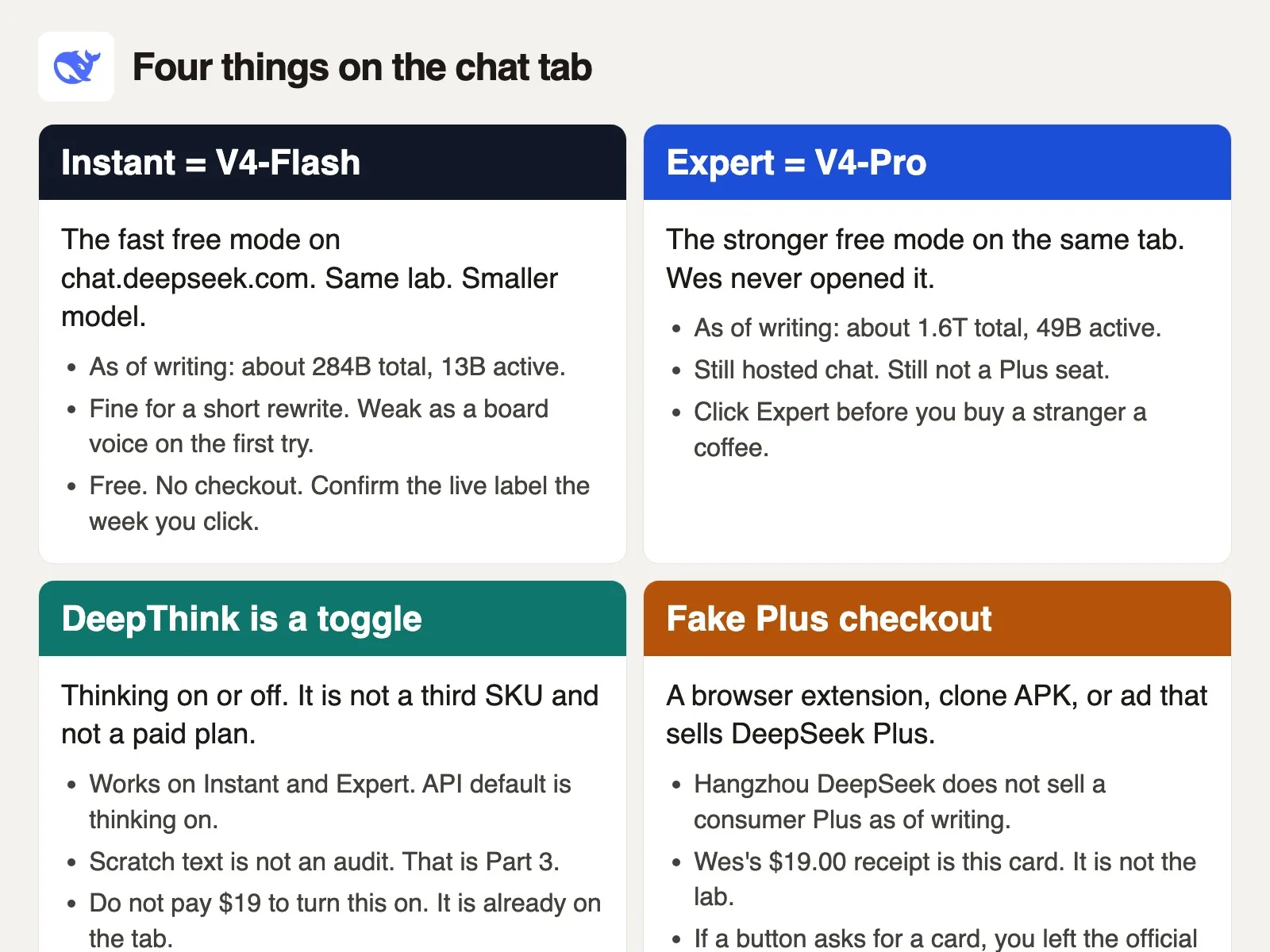
Instant Mode maps to V4-Flash. It is fast, with a smaller active parameter set, and it works well for a short rewrite, a first pass, or a quick “make this less rude” pass on an email. People often default to Instant simply because it is the starting option in the session. Defaults are not a quality ranking, though. They are only a speed ranking.
Expert Mode maps to V4-Pro, a much bigger model at roughly 1.6 trillion total parameters and about 49 billion active, in the pages checked. It runs slower in exchange. The lab’s own marketing puts Pro ahead on harder coding, math, and agent-style jobs specifically. For a 14-slide board voice, Expert is really the first click worth trying on the official tab. It is still just a chat box, though, and it still invents verbs and details if you let it run unchecked. It still does not replace the actual funnel sheet sitting on your desk.
DeepThink, the thinking toggle visible on the consumer interface, is not a third model and not a paid plan of any kind. It simply turns thinking on or off for whichever mode you have already picked. On the API, thinking is on by default in the pages checked, with separate effort knobs available. The scratch text that thinking emits along the way is a rough pad, not a signed ledger you can cite as proof. That distinction gets its own full treatment in the next post in this series, on DeepSeek’s thinking mode. Do not pay $19 just to turn thinking on. If the toggle already sits on the official tab, it is already yours for free.
An earlier preview release used Quick Mode as a sibling label at one point. If a screenshot from April 2026 says Quick, check the live control instead of trusting the screenshot. In the pages checked the current pair is Instant and Expert. Treat that as a snapshot, not a permanent fact, since screenshot-driven Slack advice tends to age badly within a week.
Free does not mean a guaranteed service-level agreement. Fair-use throttling can show up on the consumer chat during busy stretches. During those busy hours you may wait, or the tab may ask you to retry the request. That is annoying, certainly, but it is still not a Plus paywall of any kind. If you genuinely need a meter you can budget against, you actually wanted the API, not a browser checkout.
File upload and web search both exist on the official chat, in the pages checked, so confirm them in the live interface yourself. A 14-slide deck uploaded into Instant is still running on Instant. The file itself does not promote you to Pro. Switching to Expert does that instead. Neither mode makes unreleased board numbers safe to paste in, and that specific caution gets its own post later in this series. The short version for this page: if you would not email board_pack_14.pptx to that vendor directly, do not drop it in the text box either.
What to click for a deck rewrite
- Type
https://chat.deepseek.comin the address bar yourself. Do not follow a sponsored search result. - Sign in and stay on that exact host. If a new window asks for a card, you have left the real site.
- Set the mode to Expert. Then decide whether thinking should be on for this particular prompt.
- Paste a slide outline you would already feel fine putting in an email, or type the stall in your own words instead. Keep the unreleased sheet itself off the tab entirely.
- Ask for a board voice using only the numbers you are allowed to share: the stage name, the week, the stall itself. Then check it against the real sheet, because the model does not own the funnel.
Skipping these verification steps leads straight to paying for a product the lab does not actually sell, while the official model sits there free and mostly unused the whole time.
Web, iOS, Android: one official publisher
The consumer chat has three honest surfaces and a whole pile of dishonest ones. Honest: the website, the iOS app, and the Android app. Dishonest: clone installer files, lookalike store listings, and browser checkouts that sell a fake Plus tier. The real test comes down to the publisher name, the URL, and whether anyone is asking you for a card just to chat.
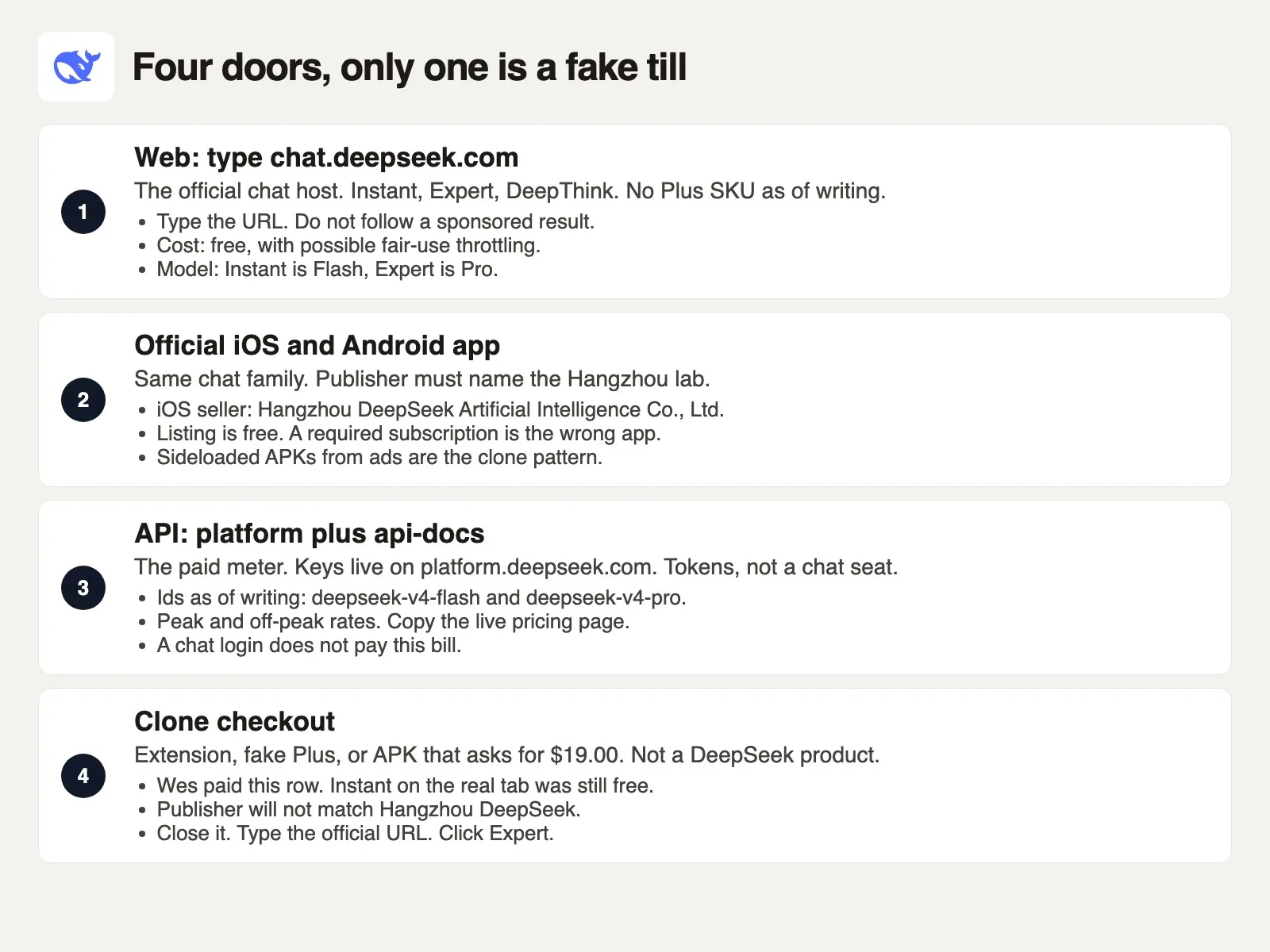
On the web, type chat.deepseek.com directly. The marketing site sits at deepseek.com. API keys live at platform.deepseek.com. Documentation lives at api-docs.deepseek.com. Those four hosts are the lab’s actual public addresses, in the pages checked. An ad that says “DeepSeek Plus login” on some other domain entirely is not a fifth official option. It is simply a till.
On iPhone, open the App Store and find DeepSeek – AI Assistant. The seller, in the pages checked, is Hangzhou DeepSeek Artificial Intelligence Co., Ltd. The listing itself is free. Apple’s app id for that exact listing is 6737597349. Support copy on the official card points to service@deepseek.com and the lab’s own account on X, @deepseek_ai. If the seller name instead reads “DeepSeek Chat Plus,” “DS Labs,” or anything you cannot match back to Hangzhou, you have the wrong app entirely. A required subscription on a lookalike listing is the same class of mistake as paying for a third-party $19 browser extension.
On Android, use Google Play and read the developer line the same careful way. The publisher listed should name the Hangzhou lab directly. Sideloaded installer files from a banner ad, a messaging app file, or a “mirror” site are the exact clone pattern that showed up in force when the app first spiked in popularity. Security researchers have already written up malware that reused the same icon. You do not need to read those write-ups yourself to follow the simple rule here. If the install did not come from Play, or from a link the official site currently prints, do not install it.
DeepSeek’s own V4 preview post reminded people to rely only on official accounts for news updates. That reminder is really about impersonation just as much as it is about model gossip. Clone store listings copy the whale logo. They copy the word “assistant.” They add a Get Premium button that the official listing simply does not have. That extra button is the real tell to watch for.
One honest edge worth naming: store search results are genuinely messy. Lookalike names rank right next to the real listing. “Free” on a clone can still hide a paid tier inside the app itself. Read the seller line carefully before you tap Get. On a laptop, just type the chat URL directly. Do not outsource that step to a browser extension that promises a plan Hangzhou simply does not sell.
Chat is free; the API is the paid meter
Two separate bills get mixed together because they share one brand name. Chat is a person sitting in a browser tab. The API is a key embedded in a script. In the pages checked, the tab itself is free, and the key is what gets metered. Paying an unvetted third party is a completely separate bill that belongs to neither one.
| Surface | Cost (checked September 2026) | Model |
|---|---|---|
| Official web Instant | Free (fair-use throttling possible) | V4-Flash |
| Official web Expert | Free (fair-use throttling possible) | V4-Pro |
| Official iOS or Android app | Free | Same Instant / Expert pair |
API deepseek-v4-flash | Per 1M tokens, peak and off-peak | V4-Flash |
API deepseek-v4-pro | Per 1M tokens, peak and off-peak | V4-Pro |
| Clone “Plus” checkout | Whatever they charge (often $19.00 or more per month) | Not the lab |
Copy actual numbers from the live pricing page the week you ship anything, and do not treat a blog post as gospel on pricing. In the pages checked from September 2026, that page lists prices per 1 million tokens, with separate cache-hit and cache-miss rows (a cache hit means the service reuses text it already processed recently, which costs less) and output rows, split between peak and off-peak windows. Off-peak runs at half the price of peak. The peak windows cited in the docs are 01:00 to 04:00 and 06:00 to 10:00 UTC (Coordinated Universal Time, the world’s reference clock), Monday through Friday. Everything outside those windows counts as off-peak.
That same page (DeepSeek’s API pricing, checked in September 2026) shows Flash cache-miss input at $0.22 off-peak and $0.44 peak, Flash output at $0.66 off-peak and $1.32 peak, Pro cache-miss input at $0.66 off-peak and $1.32 peak, and Pro output at $1.98 off-peak and $3.96 peak. Cache hits run much cheaper across the board. The context length listed on the card is 1 million tokens. Model ids on the first-call page are deepseek-v4-flash, deepseek-v4-pro, and an experimental deepseek-v4-flash-vision-exp. Flash currently routes to the July drop internally, and Pro to the August drop. Those dated internal names can move over time, so re-read the table yourself before relying on it.
New API accounts may receive a free token grant when signing up. Treat that as a snapshot too, since grants expire on their own schedule. Chat logins do not spend down that grant at all. A chat seat is simply a different merchant from console credits entirely. Mixing the two up is exactly how someone pastes a key into a plugin and then blames “DeepSeek” for a surprise invoice later.
Legacy model ids deepseek-chat and deepseek-reasoner were retired in late July 2026. If a tutorial still uses those exact strings, it is stale and needs updating. Swap the model field to the current one. Keep the key stored in an environment variable (a setting on your computer that programs can read, so the key never sits inside your code). Do not put the key inside a Chrome extension you installed simply because Instant felt too cheap to trust.
When do you actually want the API instead of the tab? When a script, an agent, or a batch job needs to call the model directly. When you need a number you can put on a real cost sheet. When Expert in the browser is the wrong shape entirely because the work is 4,000 FAQ rows, not 14 slides. The API still sends every prompt to DeepSeek’s own hosted servers either way. It is not a local folder sitting on your machine, a separate distinction covered in an earlier post on hosted access versus downloaded weights.
When do you stay on the tab instead? When you are simply a person rewriting slide 7. Expert on chat.deepseek.com is the right place for that. You do not need to open platform.deepseek.com for that job at all. You do not buy Plus from a Web Store listing either, no matter how convincing it looks.
What to check before paying for an unverified upgrade
The practical version of this whole story comes down to four named checks: the URL, the publisher, whether you are on Instant or Expert, and whether you would actually email this file to that vendor. If any single check fails, you do not paste anything in. If that last check fails, you do not paste even on the official tab itself.
Here is that same checklist written as a small script you can read out loud. Treat it as a named checkpoint, not a tool you actually need to run in production.
from dataclasses import dataclass

@dataclass
class Door:
    url: str
    publisher: str
    mode: str  # Instant or Expert on the official tab
    would_email_this_file: bool

OFFICIAL = Door(
    url="https://chat.deepseek.com",
    publisher="Hangzhou DeepSeek Artificial Intelligence Co., Ltd",
    mode="Expert",  # Instant = V4-Flash, Expert = V4-Pro as of writing
    would_email_this_file=False,  # unreleased board numbers stay off the tab
)

def named_door(door: Door) -> list[str]:
    fails = []
    if door.url != "https://chat.deepseek.com":
        fails.append("URL is not the official chat host. Type it.")
    if "Hangzhou DeepSeek" not in door.publisher:
        fails.append("Publisher is not the Hangzhou lab. Do not install.")
    if door.mode not in {"Instant", "Expert"}:
        fails.append("Mode label is unknown. Confirm Instant or Expert live.")
    if not door.would_email_this_file:
        fails.append("You would not email this file. Do not paste it.")
    return fails or ["Door named. Paste only public copy."]

if __name__ == "__main__":
    for line in named_door(OFFICIAL):
        print(line)
Run against that late-night session, the script prints the paste warning even though the official URL had already been typed correctly. That paste warning is really the useful output here. board_pack_14.pptx had unreleased funnel stalls in it. Expert would have been the right mode for a public outline of the same idea. It would still have been the wrong choice for the actual sheet itself. The $19 checkout fails the URL and publisher checks well before you ever even reach the file question.
A public FAQ already sitting on your site can safely pass would_email_this_file=True. At that point, Instant or Expert becomes purely a taste question. Start with Expert for a board voice. Drop down to Instant if you only need a shorter sentence back. Compare the two outputs on the exact same prompt. Keep the real sheet in your own private folder the whole time. The model does not get to invent a funnel stage named “alignment” on its own.
The proper click path looks like this: type the official URL yourself, ignore any extension ads that pop up, select Expert mode, rewrite slide 7 starting from a general phrase you are actually cleared to share (“demo-to-close is slow in week 12”), and paste the rewrite into the deck yourself afterward. Four minutes, zero dollars, no paid checkout involved anywhere.
The stretched whale on the extension icon had been sitting there the whole time, easy to miss until finance later asked what “DS Plus Labs” actually was on the statement. Chargebacks on extension purchases like this are messy to unwind. Name the real path before the card form ever shows up.
This week, open chat.deepseek.com by typing it in yourself. Click Expert. Run one prompt you already tried earlier on Instant. If the job involves a thinking dump you were about to paste into Slack as proof of something, stop and read the next post in this series, on DeepSeek’s thinking mode and why scratch text is not proof. The pad is not the audit. The $19 receipt is not the lab.
Series notes
This is Part 2 of Learn DeepSeek. The earlier post covered what DeepSeek actually is; the next one covers thinking mode without treating scratch as proof.
Sources
Research and further reading used for this article:
- DeepSeek: official chat (consumer web tab; Instant / Expert live there)
- DeepSeek: homepage (links to free chat and the API platform)
- DeepSeek API Docs: DeepSeek V4 Preview Release (April 2026; Expert Mode / Instant Mode on chat.deepseek.com; Flash and Pro sizes)
- DeepSeek API Docs: DeepSeek-V4-Pro GA Release (August 2026; Pro on app/web via Expert Mode; peak / off-peak API rates)
- DeepSeek API Docs: Models and Pricing (copy token rates, peak windows, and model ids the week you ship)
- DeepSeek API Docs: first call (base URL,
deepseek-v4-flash,deepseek-v4-pro, vision-exp id) - DeepSeek: API platform (keys and balance; not a chat Plus seat)
- Apple App Store: DeepSeek – AI Assistant (seller Hangzhou DeepSeek Artificial Intelligence Co., Ltd; free listing in the pages checked)
- Hugging Face: DeepSeek-V4 collection (open weights; a different path from the chat tab)
- What DeepSeek is: products plus open models
- DeepSeek thinking mode without treating scratch as proof
- Analytics Made Simple: DeepSeek from scratch (series map)
- Analytics Made Simple: Open source AI, explained
- Analytics Made Simple: Learn (related paths)
Official DeepSeek chat is free, with Instant and Expert modes, according to pages checked in September 2026. A $19 “DeepSeek Plus” Chrome checkout is often not DeepSeek at all. Use the official publisher on web and mobile, and treat the API as the real paid meter.
Imagine paying $19.00 one evening to a Chrome checkout titled “DeepSeek Plus” while working on a late-night slide deck. Slide 7, “Where the funnel stalls,” still reads like a dull status update. Instant Mode on chat.deepseek.com returned four short bullets that sounded like marketing copy, so you assume there must be a paid pro tier, the way ChatGPT Plus exists. An extension next to your bookmark bar offers an upgrade, Apple Pay finishes the purchase in two taps, and the receipt lands in your inbox from a random company called “DS Plus Labs.” You never actually opened the real Expert Mode on the official site.
Keep going
Same lessons in your feed
Short diagrams, hooks, and weekly tutorials on Substack, Instagram, X, and Facebook.